Image Based Content Retrieval: A Practical 2026 Guide
You're already living with image based content retrieval, even if you don't call it that. A shopper points a phone at a product, a security analyst scrubs through camera footage, or a robot tries to remember the corridor it crossed ten minutes ago, and the problem is the same, find the right visual moment without relying on perfect tags.
Traditional keyword search breaks fast in those situations because the thing you need often isn't in the metadata at all. Image based content retrieval exists to search by what's visible, not by what someone remembered to type, and that makes it far more useful for mobile apps, visual discovery, surveillance review, and Physical AI systems that have to work in the world.
Table of Contents
- What Image Based Content Retrieval Looks Like in Practice
- Why this feels different from keyword search
- What the system is really doing
- How Embeddings Turn Images Into Searchable Vectors
- From pixels to a searchable representation
- Why multiple layers beat a single vector
- Classical Features Versus Deep Learning Retrievers
- What the older approach got right
- What deep learning changed
- Similarity Metrics and Indexing at Scale
- How similarity ranking usually feels to the user
- Common indexing strategies for visual search
- Multimodal Fusion for Video, Audio, and Environmental Signals
- How the channels work together
- Why this matters for Physical AI
- Use Cases Across E-Commerce, Security, Robotics, and Smart Glasses
- E-commerce and mobile product discovery
- Security, surveillance, and review
- Robotics and smart glasses
- The shared pain points
- The Semantic Gap and Why Benchmarks Are Not Enough
- Where benchmark wins stop helping
- Questions product teams should ask
- Choosing a Visual Search Layer for Your Product
What Image Based Content Retrieval Looks Like in Practice
A security analyst opens a timeline full of dashboard footage and does not want to scrub through every second. She drops in a still frame of a red delivery van, and the system jumps to moments where something visually similar appears. That is the everyday promise of image based content retrieval, fast discovery from appearance instead of manual labels.
Why this feels different from keyword search
The idea comes from an older search problem. CBIR, or content-based image retrieval, emerged as a formal research area in the 1990s, and by 2000 it was already being described as a way to retrieve images from their visual properties rather than from text metadata, with features such as color, texture, and shape feeding indexing and similarity measurement in large image databases foundational CBIR survey. That history matters because the product shape has stayed familiar even as the models behind it changed.
The search term can be an image, not a phrase. Surveys and overviews describe users querying with an example image or sketch, which fits the way people work in e-commerce, security review, and mobile visual search. A shopper does not always know the brand name, and a technician does not always know the object class, but both can often point at the thing they mean.
A visual query also changes the kind of failure you have to expect. If the system only understands text, it can miss the object entirely. If it understands the image but ignores context, it can return visually similar items that are not useful at all, like the right shape in the wrong setting.
Practical rule: if the user can recognize it faster than they can name it, image based retrieval is usually the better first search layer.
What the system is really doing
Under the hood, the system makes a series of choices. It has to decide what visual signals matter, how to compare them, and how to rank similar items without slowing the app to a crawl. Older systems leaned on handcrafted features, while newer ones use learned representations, but the product question stays the same, what should count as “close enough” for this use case?
That question matters because image retrieval is rarely about exact match. It is about finding the right class of things, the right scene, or the right moment in a longer video. In practice, that makes it a better fit for visual discovery layers than for basic file browsing, especially when metadata is missing or inconsistent.
The same logic is now showing up outside pure image search. Video systems use frame-level similarity to surface a key moment. Audio search can attach visual context to a clip library. Physical AI systems on edge devices use visual retrieval to compare what a camera sees with what a robot or wearable expects to find. The core pattern stays the same, turn messy perception into something the system can compare quickly, then return the closest candidates with enough context for a person or downstream model to decide what matters.
How Embeddings Turn Images Into Searchable Vectors
An embedding reduces an image to a fixed-length vector that captures visual meaning across multiple axes. A catalog entry can point you to a painting by subject, color palette, or style, and the same idea applies here. The system turns an image into coordinates that search can compare quickly, so a product photo, a frame from video, or a scene from a robot camera can all live in the same retrieval space.
From pixels to a searchable representation
The goal is to keep enough structure for similar items to land near each other in mathematical space. CBIR systems are often described as feature extraction → similarity comparison → indexing → relevance feedback, with stored images represented as feature vectors and ranked by distance to the query CBIR workflow overview.
Modern systems go further than older image matching tools. A strong retrieval stack can combine global scene embeddings, object-level features, local details, and even text cues so the same image is searchable at both semantic and fine-grained levels multi-layer CBIR overview. That changes what a match can mean. A field of grass, a soccer ball, and a stadium may all matter at once, depending on what the user is trying to find.
For product teams, that flexibility matters because real search intent rarely stays at one level. A person might want the whole scene, a specific object inside it, or a small visual detail that confirms compliance or brand fit. The same representation can also serve multimodal video, audio, and Physical AI systems on edge devices, where perception has to be compressed into something fast enough to compare locally, then returned with enough context for a person or downstream model to interpret.
Why multiple layers beat a single vector
A single representation can miss intent. One layer may capture scene layout, another may capture object identity, and a third may capture small visual cues that matter in product or compliance workflows. When those layers are combined, the system can answer broader searches without dropping the details that make results useful.
For mobile developers, the practical takeaway is simple. An embedding is a compact representation that gives the search layer a shared language for similarity. Product teams should treat it as the map, not the destination. The map is useful only if the app can rank fast, explain enough of the result, and handle the cases where visual meaning is close but still wrong in production.
Classical Features Versus Deep Learning Retrievers
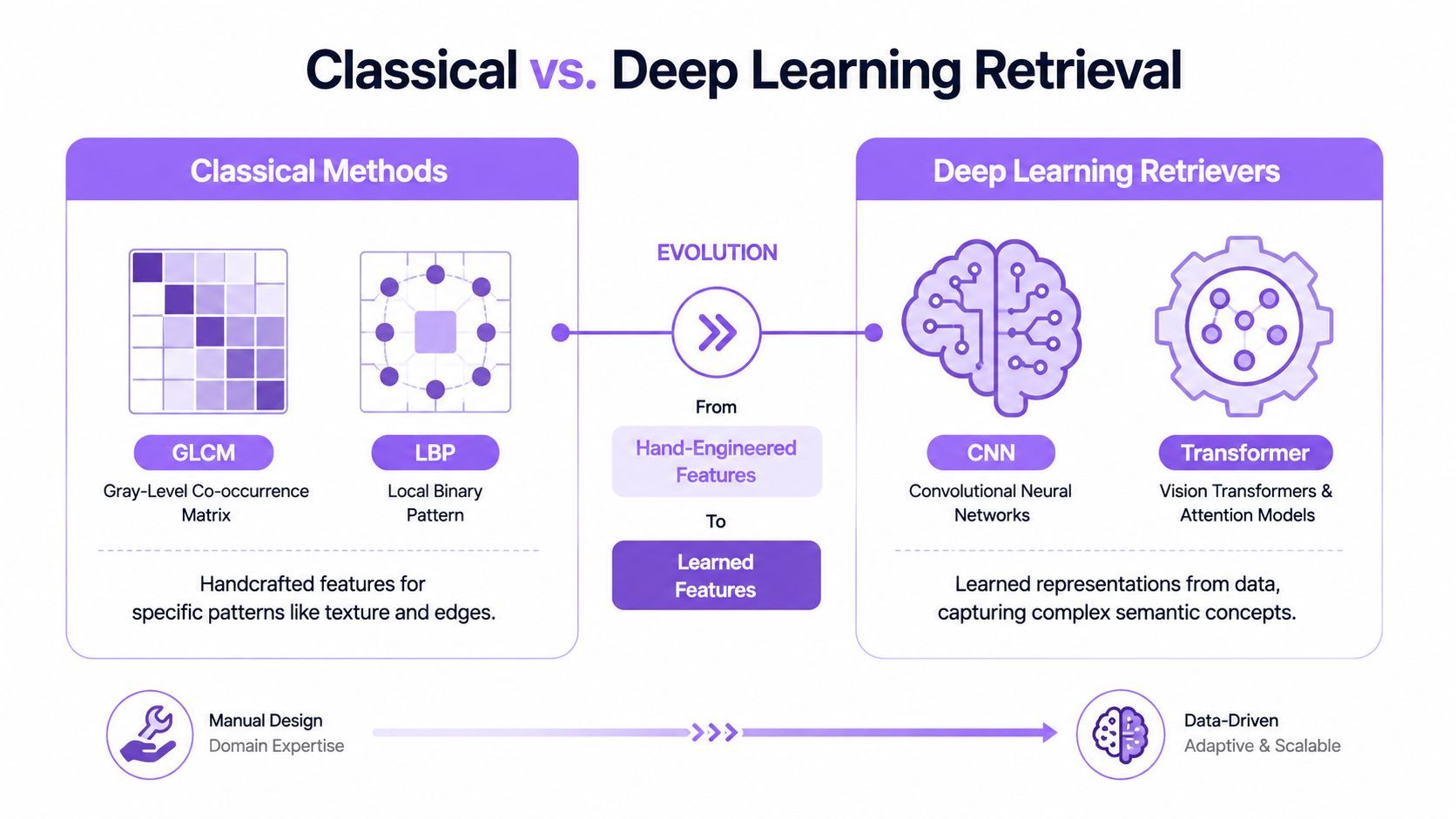
A visual search system often starts with a simple question from the product side, can we find similar images without forcing users to name what they see. The answer used to depend on handcrafted descriptors. Methods like GLCM and LBP were built to capture texture and local patterns by hand, which made them useful in narrow settings, but fragile once the visual input became messy, varied, or tied to higher-level meaning. Deep learning retrievers changed that pattern by learning representations from data, so modern search stacks behave much more like semantic discovery than image fingerprinting.
What the older approach got right
Classical retrieval was limited, but it was not pointless. Early CBIR research already showed that semantic cues matter, not just raw pixels. In one early study summarized in a 2000 article, concept-based queries reached 80% precision and 59% recall for Query 1, while non-concept-based queries in the same setting fell to 30% precision and 70% recall. The same study also reported average gains of 25% precision and 15% recall when domain knowledge was added.
That matters for product teams because the failure mode is familiar. A system that relies too heavily on surface similarity returns results that look close but miss the intent. Classical methods can still fit controlled environments, but they usually struggle once the imagery becomes diverse, noisy, or concept-heavy. The same lesson now shows up in multimodal video, audio, and Physical AI search on edge devices, where a weak representation can miss the cue a human operator cares about even if the frame still looks similar.
What deep learning changed
Deep-learning-era retrieval pushed benchmark performance much higher than classical feature engineering. A 2022 survey of image-text retrieval reported top benchmark scores on standard datasets such as COCO and Flickr30K, including 95.3 on one retrieval measure in the reported table image-text retrieval survey. In a 2025 Scientific Reports paper, a fine-tuned threshold AdaBoost approach achieved 97% accuracy, outperforming GLCM at 77%, RULBP at 85%, GLCM + DLECNN at 90%, MobileNet at 87.125%, and Xception/Inception at 92.375% 2025 Scientific Reports study.
Those results matter because they expose the product gap between legacy visual search and current retrieval layers. When someone says “visual search,” the core question is whether they mean a handcrafted feature pipeline or a learned retriever that can generalize across scene changes, lighting shifts, and different device inputs.
| Classical Features Versus Deep Learning Retrievers | Strength | Limitation |
|---|---|---|
| GLCM | Useful for texture-oriented matching | Narrow and brittle outside controlled imagery |
| LBP | Good at local pattern capture | Can miss higher-level semantic intent |
| Deep CNN retrievers | Learn representations from data | Need stronger infrastructure and tuning |
| Transformer-based retrievers | Better at complex semantic relationships | Heavier operational demands |
The practical implication is straightforward. Classical methods can still work for narrow tasks with stable imagery, but product-grade discovery across messy images, video frames, or edge-captured signals usually needs learned retrieval. That does not remove tradeoffs, it just moves them into model choice, indexing cost, and how much context the system can preserve when the search leaves the lab and enters production.
Similarity Metrics and Indexing at Scale
A query image can look simple from the outside. Under the hood, it becomes a vector, and the system still has to compare that vector against a very large corpus without slowing the app to a crawl. A brute-force scan can survive in a demo, but production traffic is less forgiving, especially on mobile networks and edge devices where latency shows up immediately to the user.
How similarity ranking usually feels to the user
Most systems rank results by distance or closeness in vector space. The math changes from stack to stack, but the product behavior is familiar. A query image returns a ranked set of near matches, and the user scans downward until the right frame, object, or scene appears. Similarity search surfaces lookalikes rather than exact file matches.
Useful rule of thumb: if the corpus is small, simpler matching can work. Once the corpus grows, search infrastructure becomes the defining product challenge.
For large-scale deployment, surveys note that deep CNN features, metric learning, and indexing methods such as approximate nearest neighbor search, Locality-Sensitive Hashing, and FAISS are used to reduce the cost of similarity matching across very large image corpora, while relevance feedback and active learning help improve precision by reweighting what the system considers similar large-scale CBIR survey. That is the operational core of the problem, not feature extraction alone.
Common indexing strategies for visual search
| Technique | Best fit | Tradeoff |
|---|---|---|
| Approximate nearest neighbor search | Large corpora that need fast retrieval | Small loss in exactness for major speed gains |
| Locality-Sensitive Hashing | Coarse similarity filtering | Less precise when visual categories overlap |
| FAISS-style indexes | High-volume vector search | Requires careful tuning and memory planning |
| Relevance feedback | Workflows where users can refine results | Adds interaction steps but improves fit |
| Active learning | Systems that improve with user behavior | Needs ongoing usage and feedback loops |
Mobile and edge constraints decide a lot of the architecture. Bandwidth, battery, memory, and latency cannot be treated as afterthoughts. If a product needs on-device recall for video, camera feeds, or smart glasses, the index design has to fit hardware limits, or the search experience quickly starts to feel delayed and fragile.
Multimodal Fusion for Video, Audio, and Environmental Signals
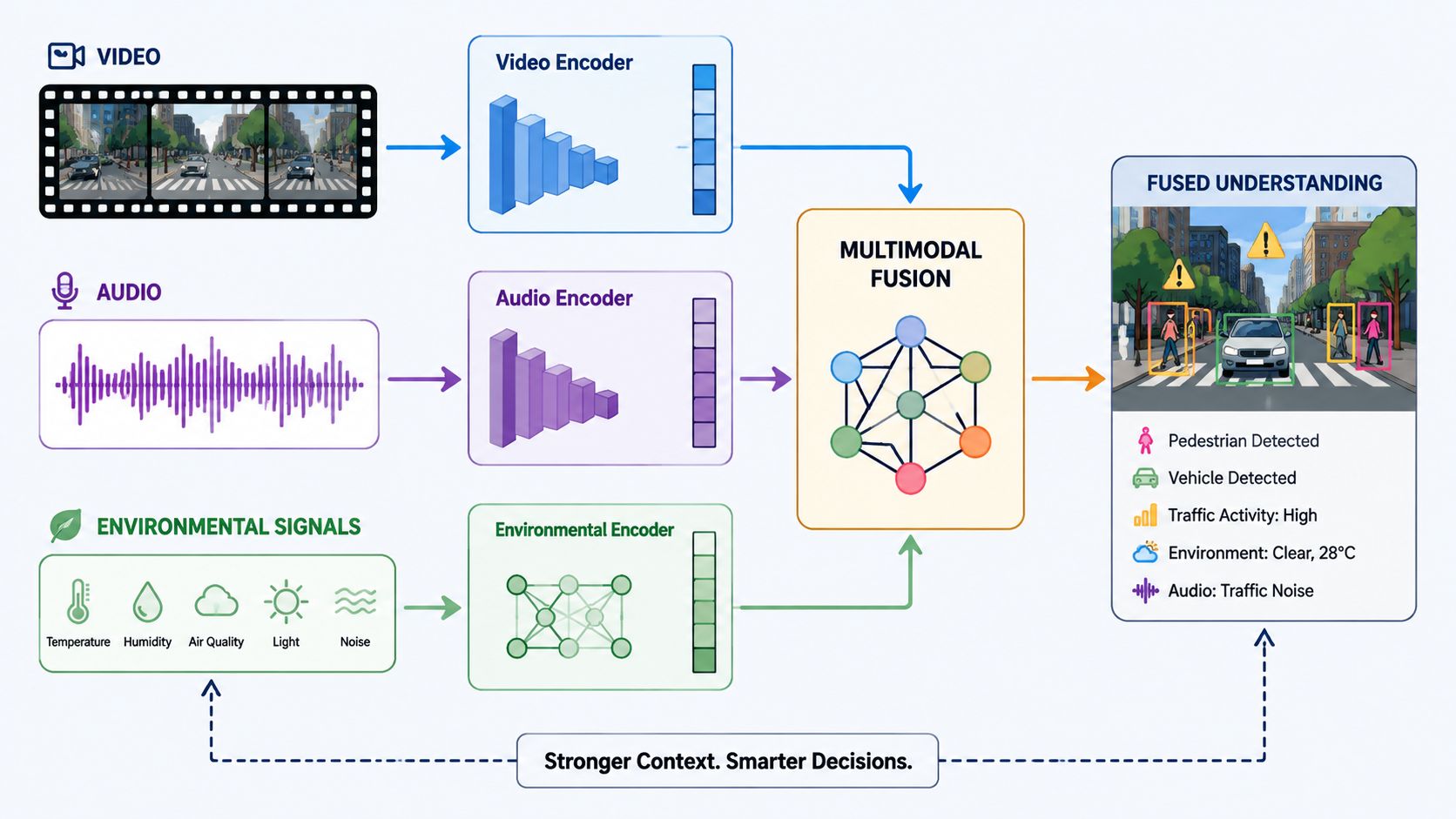
Multimodal fusion combines frame-level visuals, audio embeddings, and environmental signals into a single retrieval layer. In practice, that means the system can line up what a camera saw, what a microphone captured, and what sensors reported at the same moment. For image based content retrieval, this is the point where the stack stops treating a frame as the whole story and starts using surrounding context to improve recall.
How the channels work together
Video search becomes more useful when visual features are combined with audio embeddings, transcription cues, and environmental signals. A user might issue a text-to-video query for a scene, an image-to-video query for a known object, a voice-to-audio lookup for a spoken phrase, or an environmental-state-to-video intent that depends on what the device sensed in the room. Unified retrieval matters because people do not experience the world one channel at a time.
The operational value shows up when the system has to recover the right moment, not just the right asset. A camera frame can identify appearance, audio can capture speech or impact, and ambient sensors can confirm whether the device was indoors, moving, or facing a specific scene. When those signals are fused, the retrieval layer can separate a visually similar clip from the clip that matches the event.
That matters for edge deployments. Smart glasses, robots, and mobile companions need a memory layer that can retrieve moments from ambient content, not just files from a library. V-Modal AI describes this kind of platform as an AI-powered system for Multimodal Video, Audio Search and continuous memory, designed as a Search Layer for Physical AI across edge hardware, mobile devices, and autonomous systems, with a multimodal search API for video, image, audio, and spatial sensor indexing, plus an edge-optimized memory layer and native Android and Flutter SDKs.
Why this matters for Physical AI
Once modalities are fused, the query shifts from visual similarity to moment-level recall across modalities. That change sounds small, but it changes the product contract. The system has to support ambient memory for devices that move through the world, work under bandwidth limits, and cannot always rely on the cloud for every lookup.
The tradeoff is straightforward. More signals can improve relevance, but they also raise the cost of sync, calibration, and failure handling. A microphone may hear a useful cue while the camera sees motion blur, or a sensor may confirm context that the visual model misses. Product teams need to decide which signal should win when they disagree, because a fused stack only helps if the retrieval policy is clear.
The practical implication is larger than convenience. A visual search layer becomes the connective tissue between cameras, microphones, and sensors, which lets teams build recall instead of just capture. That is where multimodal retrieval has moved in production, and it is also where it still gets uneven results when the edge device, the network, or the sensor quality is not what the model expected.
Use Cases Across E-Commerce, Security, Robotics, and Smart Glasses
A shopper taps a photo of a jacket and wants to find the same cut in a different color. A security team wants to jump from a blurry clip to the exact stretch of footage that matters. A robot or smart-glasses app needs to remember the last environment it saw, not just a single frame. These are different surfaces, but they all depend on the same retrieval instinct, find the right moment by appearance and context.

E-commerce and mobile product discovery
In commerce, the pain point is usually naming. Customers often don't know the product term, but they know the look. Visual search gives them a way to move from inspiration to product discovery without forcing them to guess keywords, and that's why image-based lookup stays relevant in retail, marketplaces, and mobile shopping flows.
Security, surveillance, and review
In security, the pain point is time. Analysts don't want to inspect hours of footage frame by frame. A retrieval layer that can surface moments by appearance, sound, or a known scene can reduce manual scrubbing and make review sessions more targeted.
Robotics and smart glasses
Robotics and smart glasses add a memory problem on top of the search problem. The device sees the world continuously, but users need a way to ask what happened earlier, where something was seen, or which scene matches a current environment. In those products, retrieval is not a side feature, it's part of the device's awareness.
The shared pain points
- Manual scrubbing: Teams waste time scanning long video and image libraries for one relevant moment.
- Broken metadata: Tags are often incomplete, inconsistent, or missing altogether.
- Fragmented device memory: Mobile, wearable, and robotic systems capture context, but users can't easily recall it later.
- Disjointed search surfaces: Image, audio, and sensor data live in separate tools, so the user has to search more than once.
- Latency pressure: Edge devices can't always rely on cloud round trips for every query.
CBIR has long been tied to real-world platforms such as Google Images, eBay, and Pinterest because it helps when manual tagging is impractical and users need to search by appearance rather than keywords CBIR application overview. The same logic now extends into video, audio, and ambient-memory products.
The Semantic Gap and Why Benchmarks Are Not Enough
A retrieval score can look excellent and still miss the user's intent. That's the semantic gap, the distance between low-level visual similarity and high-level human meaning, and it's still one of the main unresolved problems in image retrieval semantic gap review. In plain terms, the system can return things that look right but mean wrong.
Where benchmark wins stop helping
Benchmarks reward narrow success conditions. Real users don't search that way. They ask for the scene, object, or moment they remember, and that intent can be broader than pixel similarity. Even with very high accuracy in recent systems, the returned results can still be visually close while conceptually off, which is why benchmark gains don't automatically translate into product satisfaction.
Operational issues make the gap worse. Metadata can be stale or missing, large repositories are messy, and edge hardware forces tradeoffs on memory and latency. Those constraints are common in production, but they rarely show up in headline scores.
Results need to match intent, not just shape, color, or texture.
Questions product teams should ask
- Does the search layer understand intent, or only similarity?
- Can it handle messy metadata and incomplete labels?
- Does it work when the content sits on-device, not only in the cloud?
- Can it search video, audio, and image together without forcing separate tools?
- How does it behave when the user's query is a rough example instead of a clean reference image?
Those questions are more useful than any single benchmark number. They expose whether the platform is built for research demos or for real product use.
Choosing a Visual Search Layer for Your Product
The safest way to evaluate a visual search platform is to treat it like core infrastructure, not a feature add-on. A search layer has to do more than return similar images. It needs to hold up when a product mixes video, audio, image, and sensor inputs, then runs those requests on-device, at the edge, and across different client stacks.
For mobile teams, the question is whether the system can stay useful once the clean demo environment disappears. A platform for smart glasses, robotics, or media-heavy apps should answer practical questions first. Can it search video, image, audio, and spatial sensor data together? Can Android and Flutter teams integrate it without a rewrite? Can it keep recall useful on the device when bandwidth is tight? V-Modal AI presents this kind of stack, with a multimodal search API, an edge-optimized memory layer, native Android and Flutter SDKs, and integration support for mobile devices, smart glasses, robotics, edge computing hubs, and IoT cameras.
The academic roots of image based content retrieval matter here, because they explain why the field got good at matching appearance before it got good at understanding intent. Production systems now face a wider job. They need to search across modalities, handle physical context, and work on constrained devices where memory and latency are part of the product, not just engineering details.
The next wave of retrieval is moving toward ambient memory across modalities. Product teams that evaluate for multimodal coverage, edge readiness, and query intent will have a much better shot at building something users trust.
If you're building a mobile, wearable, or robotics product that needs Multimodal Video, Audio Search and a real Search Layer for Physical AI, take a close look at V-Modal AI. It's built for on-device recall, visual and natural-language querying, and cross-platform integration across Android, Flutter, and edge systems.