Visualizing Clip Art: Modern Workflows and Search Tips
A product designer has a 90-minute screen recording open and keeps scrubbing past the same menus. They're looking for the exact frame where a hand cursor points to a settings option. The deliverable isn't a video clip. It's a still image, a visual shorthand that can fit into a slide, onboarding screen, or support article.
That small request exposes a larger change in how people work with visual assets. Clip art once meant a labeled file in a folder. Today, the same simple visual might be buried in a tutorial, screenshot library, mobile recording, robot camera feed, or generative design workflow. Visualizing clip art now involves finding the right moment across multiple kinds of media.
The practical mental model has shifted from “open an image” to retrieve a meaningful visual from a multimodal corpus. That change matters to designers, developers, video editors, and Physical AI teams that need searchable memory rather than static asset storage.
Table of Contents
- When a Simple Visual Becomes a Search Problem
- From folders to visual memory
- The Three Intents Behind Visualizing Clip Art
- Presentation rendering
- Metadata extraction
- Stylization
- A Short History of Clip Art as a Visual Asset
- Bundled libraries changed the user experience
- How Multimodal Search Pipelines Find Clip Art Moments
- Ingestion and extraction
- Indexing and retrieval
- Clip Art Visualization Across Physical AI and Video Workflows
- Practical Examples of Clip Art Retrieval in 2026
- A practical retrieval sequence
- When results miss the target
- Choosing Classic Clip Art or Modern Illustration Styles
- Match the style to the communication job
When a Simple Visual Becomes a Search Problem
Classic clip art was easy to understand operationally. A publisher supplied an image, assigned it a filename or category, and stored it in a library. You searched for “arrow,” “computer,” or “warning,” selected an asset, and placed it on the page.
Modern media libraries rarely behave so neatly. A warning symbol may appear as a printed sign in warehouse footage, a graphic inside a presentation, an overlay in a robotics interface, or a small illustration in a screen recording. The visual meaning is similar, but the surrounding media, timestamp, audio, and text are different.
Practical rule: Search for the visual idea and the context around it, not only the asset's presumed filename.
That distinction becomes clear in the designer's screen recording. A keyword search for “cursor” might return files whose names contain the word, while a semantic query such as “hand cursor pointing at the settings menu” expresses the scene the designer remembers. If the recording also contains spoken instructions, the audio can help distinguish the intended moment from visually similar frames.
From folders to visual memory
The old folder model assumes that someone already knows where an image belongs. A multimodal workflow assumes the opposite. The user remembers an appearance, action, sound, or relationship, then describes it in natural language.
That creates several connected tasks:
- Discovery: Find a relevant visual in a large collection.
- Isolation: Separate the useful still or short segment from surrounding footage.
- Interpretation: Understand whether the image shows an icon, sign, illustration, diagram, or interface element.
- Reuse: Render the result in a format suitable for a presentation, product interface, training record, or editorial workflow.
The asset may be simple, but the retrieval problem isn't. A still extracted from video can carry scene context, spoken language, visible text, and nearby actions. Treating it as an ordinary image can discard the clues that make it findable.
This is why visualizing clip art in 2026 is less about reviving a file format and more about connecting visual intent with searchable media memory. The same recognizable graphic can serve as a design element, a retrieval target, or a perception cue for an autonomous system.
The Three Intents Behind Visualizing Clip Art
A designer may remember a pointing hand, a delivery box, or a warning symbol without remembering its filename. A developer may need that same image rendered for a slide, described for search, or converted into a different illustration style. “Visualizing clip art” therefore names three related intents, and separating them helps teams choose the right retrieval and rendering steps.
Presentation rendering
The first intent is presentation rendering. A designer places an illustration in a slide, dashboard, onboarding screen, or explainer so the audience can grasp the message faster than text alone.
Clip art works like signage. A familiar warning triangle, delivery box, or pointing hand communicates through a visual grammar that viewers recognize quickly. It does not need to explain every detail. It establishes direction, category, or emphasis while fitting the surrounding design system.
The rendering choice follows the use case. A flat vector asset suits a diagram because it can be recolored and scaled without losing clean edges. A raster image may be fine at a fixed presentation size, yet appear soft when enlarged. Contrast, background treatment, and the illustration's tone also determine whether the asset supports the audience or distracts from the message.
Metadata extraction
The second intent is metadata extraction. The image becomes a catalog item rather than a finished decoration. Its usefulness depends on the information attached to it.
A library catalog records more than a book's title. It can include subject, language, author, and related topics. Visual search systems apply a similar model to media by connecting an asset with objects, visible text, scene context, and embedding representations. That structure lets someone find the image later without recalling its original filename.
The surrounding file can supply important clues. OCR may capture text inside a poster or slide. Object and scene descriptions can identify what appears around the graphic. A query such as “blue delivery icon on a training slide” can then match both the illustration and the words or setting around it.
For video and Physical AI workflows, these signals also help connect a visual cue with an action or instruction. A robot-training clip, for example, may contain the same kind of icon as a presentation, but its timing and surrounding scene determine why the frame matters.
Stylization
The third intent is stylization. A user starts with a photograph, screenshot, or reference image and requests a flatter, more illustrative result.
The process resembles a watercolor study. The subject remains recognizable while detail is reduced, edges are simplified, and the shapes that communicate fastest receive more emphasis. A modern illustration pipeline might produce a classic flat icon, a tactile hand-drawn graphic, or a more expressive hybrid.
Define what must survive before changing the style. It may be the pose, object category, color relationship, or instructional sequence. An attractive result can still fail if it removes the feature that carries meaning.
The intents can overlap. A video editor may retrieve a frame, attach metadata, and stylize it for a presentation. Treating rendering, extraction, and stylization as distinct decisions makes a multimodal clip art workflow easier to configure, test, and reuse.
A Short History of Clip Art as a Visual Asset
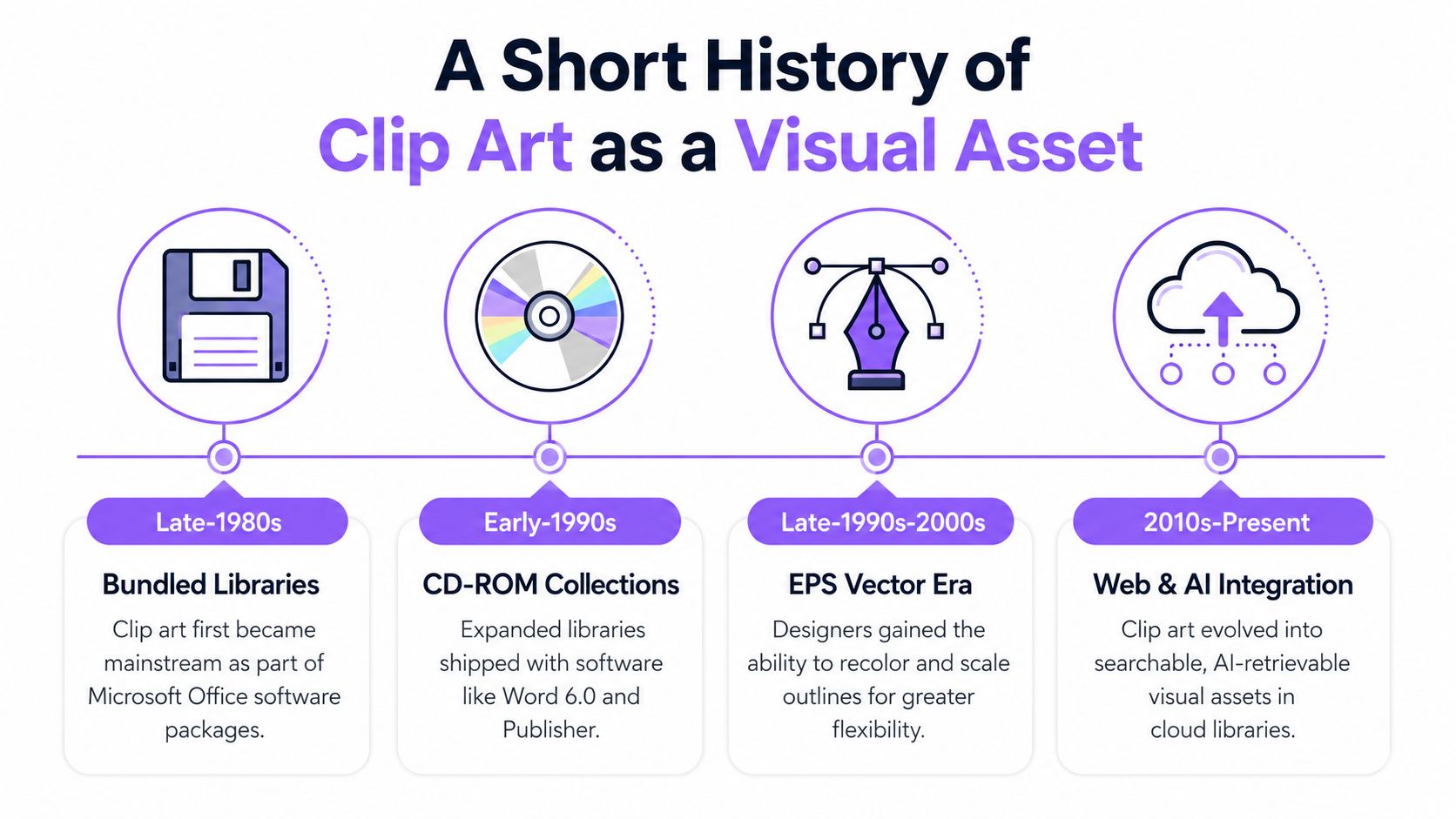
A presenter in the early PC era could replace physical paste-up work with a ready-made digital image. VCN ExecuVision, released in 1983, is widely cited as the first commercially available presentation software to ship with a professionally drawn clip-art library, helping move visual production toward desktop workflows. Tedium's history of clip art describes this transition and the format's rapid expansion.
By the mid-1980s, clip art had developed beyond simple bitmap images. Adobe introduced Illustrator for Macintosh in 1986, and vector formats such as EPS and CGM became common by the late 1980s. Scaling and reuse became easier across print and presentation work. Designers could recolor an asset, resize it, or adapt its outlines after downloading it. The file was no longer just a finished picture. It was a visual component that could be configured for a new context.
Bundled libraries changed the user experience
CD-ROM distribution reshaped access during the 1990s. CDs could hold hundreds of times more data than floppy disks, so publishers could package much larger libraries with software. Clip art became a mass-market add-on rather than a resource limited to specialist print shops, as documented by Tedium's account of clip-art distribution.
Microsoft Office brought the category into everyday document work. Microsoft introduced clip art with Word 6.0 in 1993, beginning with 82 illustrations. The library later grew to more than 100,000 illustrations. Another historical account records that Microsoft Word 6.0 in 1996 bundled 82 clip-art graphics, with the collection later expanding to more than 140,000 images. The differing figures reflect how quickly these libraries changed as office software made visual assets widely available. Hyperallergic's illustrated history covers the Office-era lifecycle and its eventual decline.
Microsoft ended its online Clip Art library on December 1, 2014, replacing the built-in collection with Bing image search. Discovery had moved from a fixed package toward a searchable web. The enduring requirement stayed the same: find a recognizable visual quickly, then reuse it in a different setting.
That requirement now includes frames extracted from tutorials, demonstrations, and robot-training videos. A frame can communicate a menu action, safety condition, object category, or process step without being labeled “clip art.” Visualizing clip art therefore describes a retrieval task as much as an asset format. The system must identify a meaningful moment, preserve its visual context, and make that moment reusable.
How Multimodal Search Pipelines Find Clip Art Moments
A designer searches for a simple warning illustration, while a developer searches a video library for the exact frame where that warning appears. Both requests are retrieval problems. The system must turn mixed media into descriptions a search engine can compare, much like a librarian cataloging books, photographs, recordings, and diagrams before answering a reader's question.
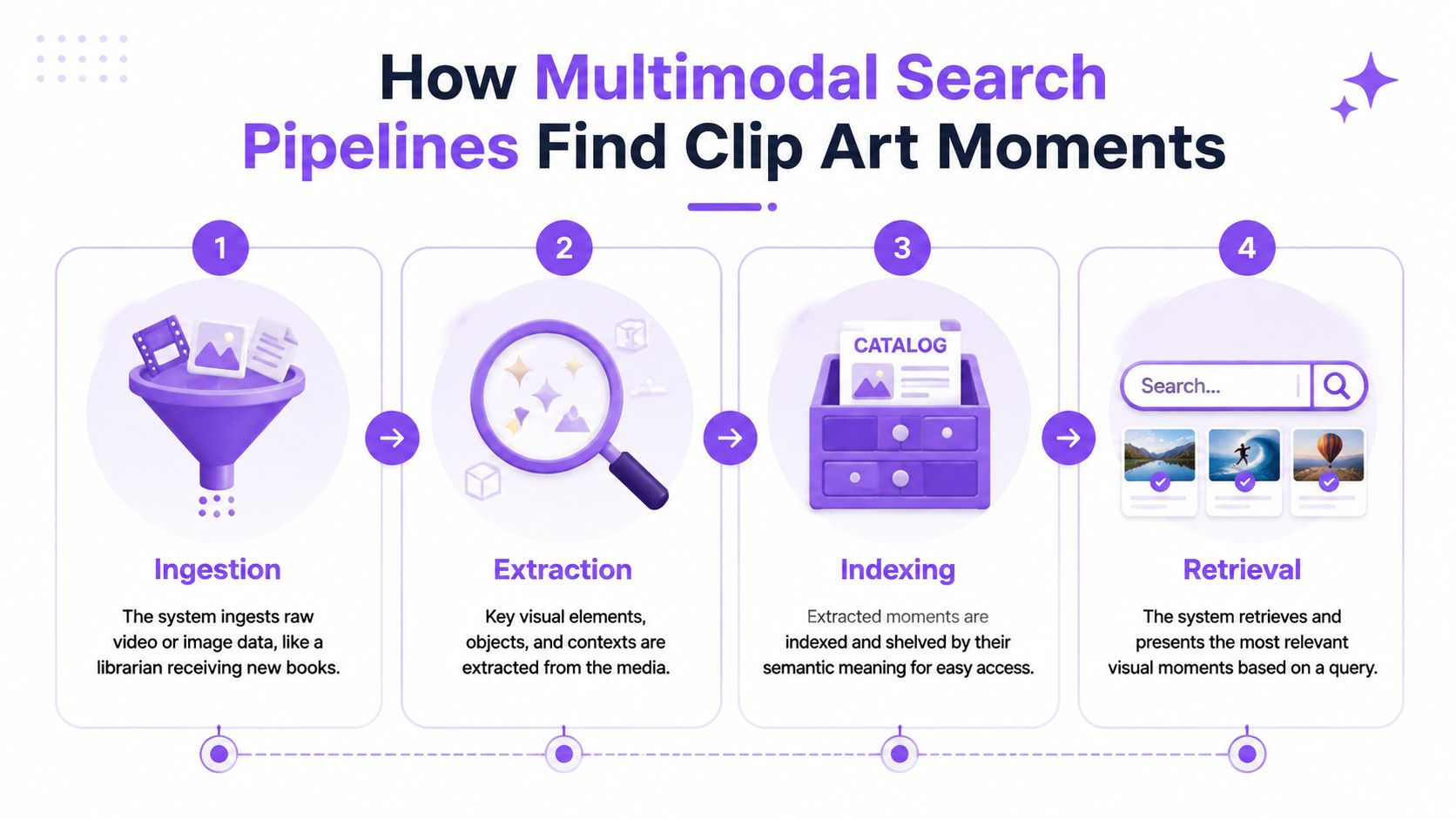
Production multimodal search commonly uses four layers: ingestion, extraction, indexing, and retrieval. Industry guidance on building multimodal search engines outlines this pattern for video, image, and audio inputs.
Ingestion and extraction
Ingestion brings raw media into the pipeline. A video may be divided into scenes or sampled at intervals before the system creates visual representations. Audio, still images, and metadata enter through the same intake stage, but each format needs its own processing rules.
Extraction converts that material into searchable signals. Video supplies frames and scene information. Audio can supply transcripts or sound context. OCR captures words visible on a slide, sign, interface, or poster. The system can then place these signals in a shared embedding space. A query for a warning symbol or a hand-drawn object can find a relevant frame even when its filename contains no useful description.
Extraction also requires filtering. A long video may contain blurred transitions, repeated views, and many frames that add little information. Technical guidance on video semantic search describes shot-boundary detection, representative key clips, frame-difference measures such as SSIM, and entropy-based filtering for selecting more informative visual examples.
Indexing and retrieval
Indexing organizes the extracted signals for search. Metadata handles exact questions, such as whether a frame contains particular OCR text. Embeddings handle broader intent, such as finding an image that resembles a simple warning illustration even though nobody labeled it “clip art.”
Hybrid search combines these strengths. Keyword matching can miss visually similar assets with generic filenames, while vector similarity can overlook exact labels, visible text, or product terms. Combining semantic similarity with keyword matching, metadata filters, and reranking gives the query several routes to a useful result.
Retrieval returns the best matching frame, segment, or asset. Asynchronous ingestion and caching can keep repeated visual queries responsive while a team browses a shared library or refines its wording. The interface should feel like a catalog that recognizes meaning. Users can search for what the image shows, what the speaker says, or what happens at a particular moment, instead of guessing how an old folder was organized.
Clip Art Visualization Across Physical AI and Video Workflows
The same visual can play very different roles across media and robotics. An advertising editor wants a reusable moment that supports a narrative. A robot may need a visual marker that anchors perception, action, or operator feedback. A multimodal search product must connect images with audio and time rather than treating each file as an isolated object.
Physical AI is commonly described as a stack containing sensors and compute, a robot platform, structured training data, a policy, and a repeatable real-world evaluation loop. A practical Physical AI guide for 2026 describes collecting about 100 demonstrations for a simple manipulation task and validating with around 20 trials. Those figures illustrate why searchable episode memory matters. Teams need to locate failures, interventions, and successful attempts, not merely store final images.
Robotics data is also multimodal. Camera frames can sit beside joint angles, force readings, gripper state changes, actions, and task metadata. A 2026 overview of robot training data discusses multimodal robot-learning datasets, including sensorimotor time series, multi-camera video, indexing, and streaming. Manual review becomes difficult when long-horizon behavior is distributed across synchronized streams.
Advertising video editing has a different priority. Editors search for a visual moment, then trim, remix, or pair it with narrative and sound. Semantic clip search can replace much of the manual tagging and timeline scrubbing involved in finding described scenes, while automated transcription and prompt-based editing connect visual discovery with production work. Video search and automation guidance gives examples such as searching for a “sunset beach scene.”
Multimodal audio and video introduce their own failure modes. A recent survey of multimodal video and audio generation describes the emergence of models that jointly produce or reason over both modalities since late 2025, including Veo 3.1, Sora 2, Kling 2.6, Wan 2.6, and OVI. For retrieval, the practical concerns are synchronized timestamps, ambiguous scene boundaries, and queries that depend on both what happened and what was heard.
| Domain | Primary use case | Retrieval pain point | Best fit technique |
|---|---|---|---|
| Physical AI | Searchable memory for robot episodes and interventions | Fragmented sensor streams and difficult replay | Cross-modal episode retrieval |
| Vision for robotics | Find objects, markers, and task-relevant visual states | Similar frames may represent different actions | Frame-aware visual search with contextual reranking |
| Audio for robotics | Locate spoken commands, alarms, or environmental sounds | Audio meaning may not align cleanly with the visible frame | Timestamped audio-video retrieval |
| Advertising video editing | Find graphic moments and scenes for reuse | Manual tagging, licensing review, and narrative matching | Semantic search with metadata and editorial filters |
Practical Examples of Clip Art Retrieval in 2026
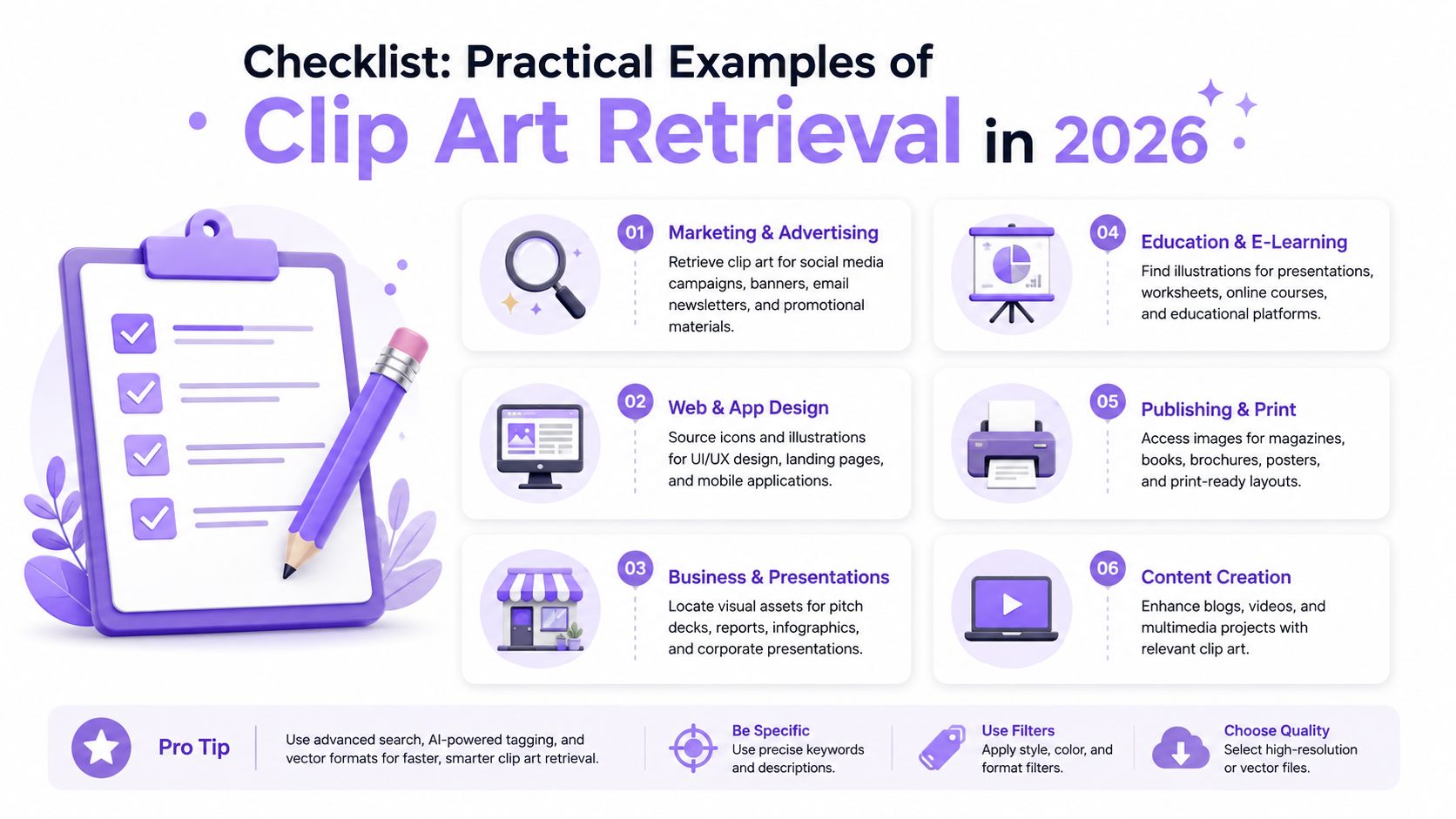
Consider a warehouse team reviewing operational footage. The request is not “find file forklift-warning-sign.png.” It's “find every moment showing a forklift warning sign so the safety team can review the footage.” A natural-language video search workflow can connect the query with visual frames, surrounding context, and time segments.
The same pattern appears in presentation production. A business records a long presentation and wants a concise visual summary. The system can select representative keyframes, remove blurry or duplicate frames, and surface slides containing charts, icons, or clip-art-style graphics.
A practical retrieval sequence
- Describe the visual event: Use object, action, location, and visible text where possible. “Forklift warning sign near the loading area” is more useful than “safety image.”
- Add the modality that carries the clue: Include spoken wording if the operator announces the event. Add an image query when the target resembles a known icon or illustration.
- Review the returned segment: A relevant frame may sit beside the actual event, so inspect the surrounding context before exporting a still.
- Choose the output form: Keep the original frame for evidence, crop it for a slide, or recreate the visual as a clean illustration when the source contains sensitive or distracting detail.
- Record the reason for selection: Store descriptive metadata so another editor or engineer can understand why the frame was chosen.
Tools such as Twelve Labs, Marqo, and Vectron represent different ways teams may approach media and vector retrieval. A CLIP-style embedding model can group clip-art-like imagery by visual resemblance even when filenames are generic, but the surrounding metadata still matters for precise production use.
When results miss the target
Use a short debugging checklist:
- Query too broad: Add the action, setting, or visible wording.
- Wrong modality: Search audio, OCR, or image similarity instead of relying only on the transcript.
- Redundant frames: Apply representative-frame selection rather than indexing every neighboring frame equally.
- Stylistic mismatch: Search for the intended illustration grammar, such as flat vector, hand-drawn, or diagrammatic.
- Context loss: Return a time segment with the still so reviewers can confirm meaning.
- Licensing uncertainty: Separate retrieval from approval and verify that the selected asset can be reused.
For video search, chapterizing footage with shot-boundary detection and filtering keyframes with SSIM and entropy signals can improve the quality of the visual candidates. The reason is straightforward. A compact index of clear, information-rich frames is easier to search than a collection dominated by duplicates and blurred transitions.
Choosing Classic Clip Art or Modern Illustration Styles
Clip art isn't disappearing. The term is changing from a fixed asset category into a search intent. Users often want a simple, editable visual, but that visual may now be a traditional stock illustration, a tactile hand-drawn graphic, an AI-assisted composition, or a surreal three-dimensional hybrid.
Microsoft's guidance on finding clip art and other images treats clip art largely as a search filter or keyword behavior rather than a complete design system. That distinction helps explain why modern users can ask for “clip art” while expecting a contemporary visual language.
Match the style to the communication job
Classic flat vectors remain useful for instructional diagrams, interface explanations, process maps, and internal documentation. Their visual economy makes categories and relationships easy to scan. They also tend to integrate cleanly with layouts that require recoloring, consistent stroke weights, or scalable output.
Tactile and risograph-inspired styles can make editorial or community-facing content feel more personal. AI-assisted illustration can help explore directions quickly, but it requires closer review for consistency, unwanted details, originality, and commercial usability. A marketing hero graphic may need a distinctive art direction, while a safety instruction may benefit from a familiar, restrained symbol.
Use this checklist before selecting or generating an asset:
- Audience expectations: Will the visual feel clear and credible to the people using it?
- Message priority: Does the style clarify the idea, or does it compete with the message?
- Format requirements: Do you need an editable vector, a transparent raster, or a time-linked video frame?
- Scalability: Will the asset appear across mobile screens, presentations, print, or physical displays?
- Licensing clarity: Can your team document the asset's permission and intended use?
- Rendering fidelity: Does the exported result preserve text, edges, colors, and important visual relationships?
- System consistency: Can new assets follow the same visual grammar as the existing library?
The best clip art choice is the one that makes the intended action or idea obvious without adding interpretive work.
For developers, that means search should expose style and context, not just object labels. For designers, it means the phrase “clip art” should start a conversation about visual grammar rather than end it with a generic icon. In 2026, visualizing clip art is a deliberate act of choosing, retrieving, and adapting the simplest visual language that fits the message.
V-Modal AI offers a Visual Memory Layer for Physical AI, with Multimodal Video, Audio Search across video, image, audio, and spatial sensor streams. Explore the V-Modal AI project to evaluate natural-language retrieval for robotics, edge devices, mobile apps, and continuous physical-world memory.