How to Search for Video Clips Using Physical AI
You've got the footage. A dashcam has recorded an entire route, a CCTV system has stored days of ambient activity, or a GoPro has captured a long session without reliable filenames. Someone now needs one moment, perhaps a warning sound, a person entering a restricted area, a machine movement, or a usable shot for an advertisement. The familiar response is to open the timeline and start scrubbing.
That workflow treats physical data as an archive of files instead of a searchable memory. Search for video clips is moving toward a different model, one that combines visual context, speech, ambient audio, and device state so teams can ask for the event they remember rather than the filename they never created. The shift matters most at the edge, where mobile devices, smart glasses, robots, dashcams, and cameras often capture more information than a person can review manually.
Table of Contents
- The Shift from Manual Scrubbing to Multimodal Search
- Why legacy tagging runs out of road
- Core Challenges in Edge Video Retrieval
- The pain points teams meet in production
- Why evaluation must include failure cases
- Crafting Effective Multimodal Queries
- Start with the retrieval intent
- Combine signals instead of adding random keywords
- Search for evidence, then verify the cut
- Comparing Hardware Stacks and Memory Layers
- Cloud versus localized memory
- Industry Applications for Physical AI Search
- Advertisement video edition
- Vision and audio for robotics
- Dashcam, CCTV, and surveillance
- Integrating a Search Layer into Your Workflow
- A deployment checklist
The Shift from Manual Scrubbing to Multimodal Search
Manual scrubbing fails because a timeline exposes time, not meaning. A user may remember “the moment the forklift alarm sounded while the red indicator was flashing,” but a conventional media library only knows a file name, a timestamp, and perhaps a manually entered tag. Keyword metadata can't reliably represent an unplanned event, especially when nobody knew in advance what would become important.
Video already appears frequently in general search discovery. MozCast-based tracking found video in 38.5% of tracked Google search results on 20 July 2026, compared with a 53.7% peak, using a daily sample of 10,000 hand-picked keywords across 20 industry categories and five U.S. cities, as summarized by video SEO tracking data from Vidico. The same industry summary reported that only about 0.34% of web pages use VideoObject markup, while roughly 6.40% of desktop pages contain video, which points to a useful imbalance. Video is commonly surfaced, but machine-readable structure remains uncommon.
Why legacy tagging runs out of road
Traditional tagging still works for known assets. It helps an editor find a project folder, a camera operator retrieve a recording by date, or an investigator filter a location. It breaks down when the desired clip has no clean title, when speech matters more than the image, or when the same visual scene appears in several recordings.
Historical retrieval research illustrates the operational difference. One evaluation reported an average retrieval time of 92 seconds per video, and successful users retrieved 175 relevant clips in the test. Only 41% of users retrieved something, with text-only search used by 61%, mixed text and filters by 24%, and filters alone by 11%. Filters-only achieved 81% effectiveness, compared with 47% for text-only and 21% for mixed modality, according to the academic video retrieval evaluation.
Practical rule: Search should return a reviewable time segment, not merely a file that someone must inspect from beginning to end.
Physical AI changes the expectation. A robot, smart-glasses app, or surveillance console can treat captured footage as localized memory. The user asks for a visual event, an audio cue, or both, and the system narrows the history to moments worth reviewing. That doesn't eliminate human judgment. It removes the least valuable part of the job, searching blindly through opaque recordings.
Core Challenges in Edge Video Retrieval
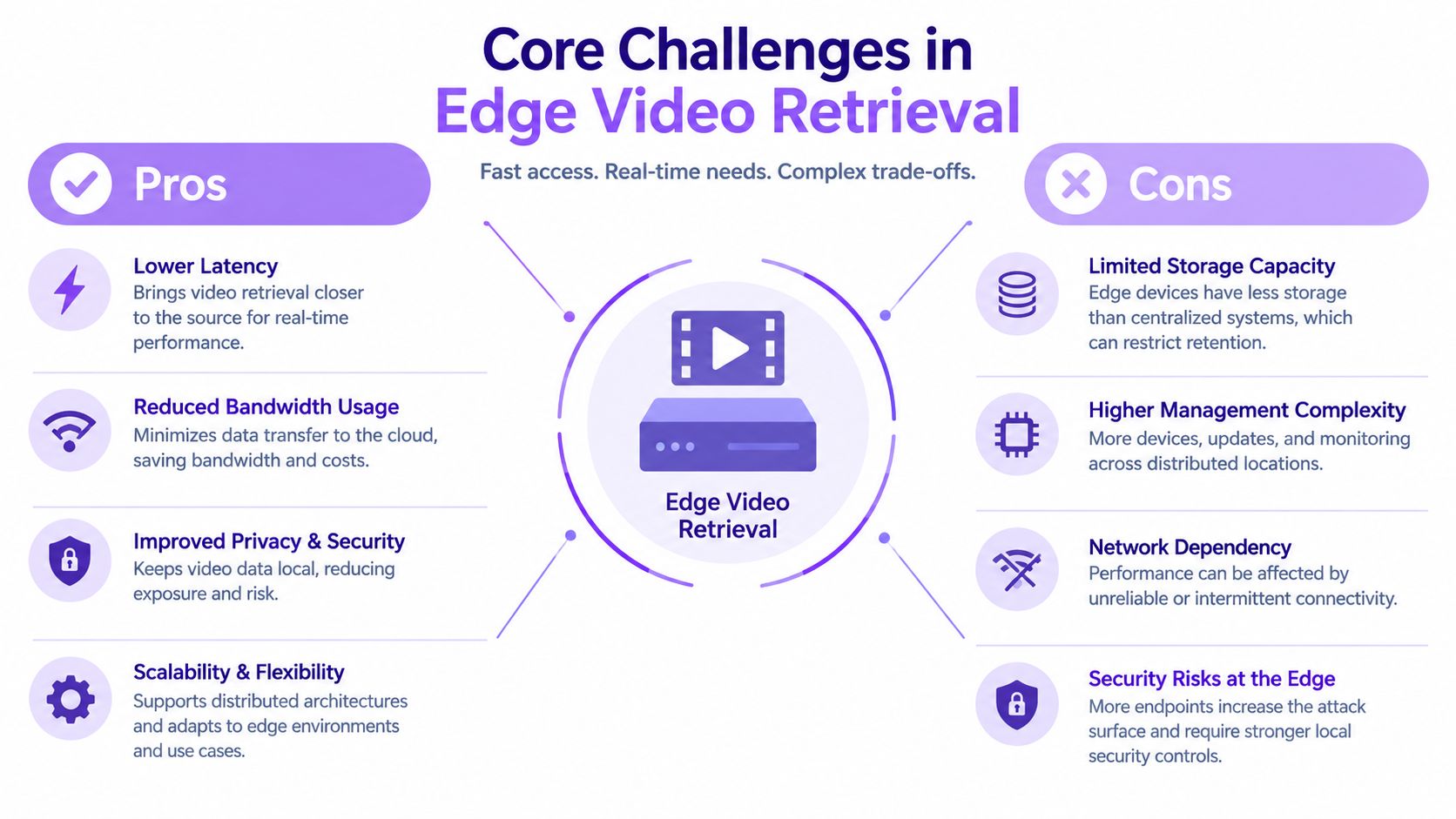
Edge retrieval sounds straightforward until the hardware has to capture, preserve, and search continuously. Mobile phones have limited thermal headroom. Smart glasses must protect battery life and remain comfortable. Dashcams and GoPros operate with intermittent connectivity and constrained storage. CCTV systems may record across many cameras, each with different clocks, codecs, lighting conditions, and audio quality.
The pain points teams meet in production
Fragmented audio and video create false matches. A camera may show a door opening while a nearby microphone captures the relevant alarm, but separate pipelines can assign those signals different timestamps. Users then receive a visually plausible clip that misses the sound that made the event important.
Cloud dependency adds bandwidth, latency, and operational exposure. Continuous streams are expensive to move and awkward to upload over unstable mobile networks. A driver reviewing a dashcam recording offline, or a field worker wearing smart glasses in a low-connectivity area, can't rely on a round trip to a remote service for every query.
Large media transfers can destabilize mobile software. A native Android app or Flutter application that loads an entire recording into memory risks slow playback, crashes, and poor battery behavior. Chunked handling, resumable transfers, and local retention policies matter more than a polished search box.
Disconnected device history produces an incomplete memory. The phone sees one part of an interaction, the glasses another, and the edge camera a third. Without a consistent way to associate those recordings, a user searches each device separately and reconstructs the event manually.
Why evaluation must include failure cases
A retrieval system can appear impressive in a controlled demo and still disappoint in a noisy warehouse, a dark street, or a crowded room. Long recordings contain occlusion, overlapping speech, reflections, wind, compression artifacts, and events that unfold across several moments rather than one frame.
For long-video search, Recall@K is a useful primary metric because it measures the share of true relevant clips appearing among the top-K results. A multimodal long-video benchmark reported clip-level R@1 results between 35.8% and 40.3% for clip-to-text and text-to-clip retrieval, showing that exact first-result matching remains difficult, as documented in the long-video retrieval benchmark.
A serious test set should include short and long recordings, open-web material, natural user queries, audio-only clues, visual-only clues, and queries requiring multiple evidence clips. One benchmark built 1,440 samples across 20 categories, while another used 87,697 clips and 274,933 user-style queries to test audiovisual retrieval where both sound and vision are required, according to the multimodal video benchmark research. Those figures describe benchmark design, not a guaranteed production outcome. They do, however, show why a single clean demo isn't enough.
Crafting Effective Multimodal Queries
A vague query such as “find the accident” leaves too much room for interpretation. Good queries describe the observable event, the context, and, when useful, the signal that confirms it. You don't need to expose internal data processing to improve the request. You need to tell the search layer what a reviewer would recognize.
Start with the retrieval intent
Use the mode that matches the evidence you remember:
- Text to video: “Find the clip where a cyclist crosses in front of the vehicle at the roundabout.”
- Image to video: Provide a reference frame or product image, then search for scenes with the same object, logo, or visual composition.
- Voice to audio: Ask for the recording containing a repeated warning tone, a spoken phrase, or a machine sound.
- Environmental state to video: Search for “the period when the loading bay was occupied and the warning light was on.”
The last form is particularly useful in Physical AI. A robot may need to recall a state transition, while a surveillance operator may care about a combination of location, movement, and sound rather than a named object.
Combine signals instead of adding random keywords
A query becomes more useful when each clause narrows the event:
- Name the subject. Person, vehicle, robot arm, package, machine, or animal.
- Describe the action. Entered, stopped, fell, turned, lifted, opened, or collided.
- Add the setting. Rear entrance, warehouse aisle, road junction, workshop, or living room.
- Add an audio or state cue. Alarm sounded, someone shouted, engine tone changed, or indicator flashed.
- Use time only when you know it. A route, shift, or approximate recording period can reduce irrelevant matches.
“Find a person near the gate” is broad. “Find the moment a person in a dark jacket approaches the rear gate while the alarm sounds” gives the system several independent signals and gives the reviewer a clear reason to accept or reject a result.
Search for evidence, then verify the cut
Natural-language search is a discovery tool, not a license to publish the first returned frame. Users should review surrounding context, confirm the audio alignment, and check whether the event is actually continuous. This matters in advertisement video edition, where a visually similar shot may have the wrong product placement, expression, or camera movement.
Search quality also depends on the wording users use. Teams should collect failed queries, group them by intent, and create examples that reflect field language rather than internal engineering terminology. The objective isn't to force users into a rigid syntax. It's to teach them that combining sight, sound, and environment usually works better than repeating generic nouns.
Comparing Hardware Stacks and Memory Layers
A mobile phone, a smart-glasses system, a dashcam, a GoPro, and a CCTV installation all produce video, but they don't have the same memory problem. The phone has a capable application runtime and a user interface. Smart glasses prioritize low weight, hands-free interaction, camera input, microphones, and contextual audio. A dashcam favors continuous capture in a moving vehicle. A GoPro emphasizes compact recording and later transfer. CCTV prioritizes retention, multi-camera coverage, and operational review.
NVIDIA describes Cosmos 3 as an omnimodal Physical AI platform that unifies text, images, video, audio, and action trajectories for robotics, autonomous driving, and industrial smart spaces, as outlined in its Cosmos 3 model documentation. Its support for joint video-audio generation and audio-conditioned video, together with world-action modeling, signals where robotics memory layers are heading. Search can't remain only a visual lookup if the system must connect what a robot saw, heard, and did next.
| Hardware Stack | Primary Modality Focus | Memory Strategy |
|---|---|---|
| Mobile app | Video, voice, images, user context | Local cache with selective synchronization and resilient media handling |
| Smart glasses | Camera, microphones, spatial and contextual cues | Short local memory for hands-free recall, with edge assistance when available |
| DashCam | Road video, navigation context, incident audio | Rolling local retention with event-focused retrieval |
| GoPro | High-motion video and ambient audio | Device storage first, searchable transfer or companion-device indexing |
| CCTV | Multi-camera video, audio where available, location and time | Distributed edge hub memory with controlled archival access |
| Robotics edge stack | Video, audio, actions, sensor state | Continuous hardware-local memory linked to task and environmental state |
Cloud versus localized memory
Cloud search offers centralized administration and easier access across devices. It also introduces upload dependencies and can turn every retrieval request into a network operation. Edge indexing reduces that dependency and can keep sensitive footage closer to its source, but it shifts responsibility to local compute, storage lifecycle, thermal limits, and model updates.
Smart glasses make the trade-off visible. Research on an accessibility prototype used an embedded camera and stereo audio cues to support hands-free scene scanning and directional guidance, while recent smart-glasses coverage describes the broader combination of cameras, microphones, sensors, and AI software. The useful design isn't “put a full data center on the glasses.” It's to keep immediate memory and interaction local, then use a nearby phone or edge hub for heavier recall.
Physical AI systems increasingly capture video, audio, and sensor data as one synchronized operational record. That creates practical pressure around clock alignment, long recordings, and ambient noise, the same problems identified in Physical AI data workflows. Teams should choose the memory layer according to the device's role, not force every stack into the same cloud-first pattern.
Industry Applications for Physical AI Search
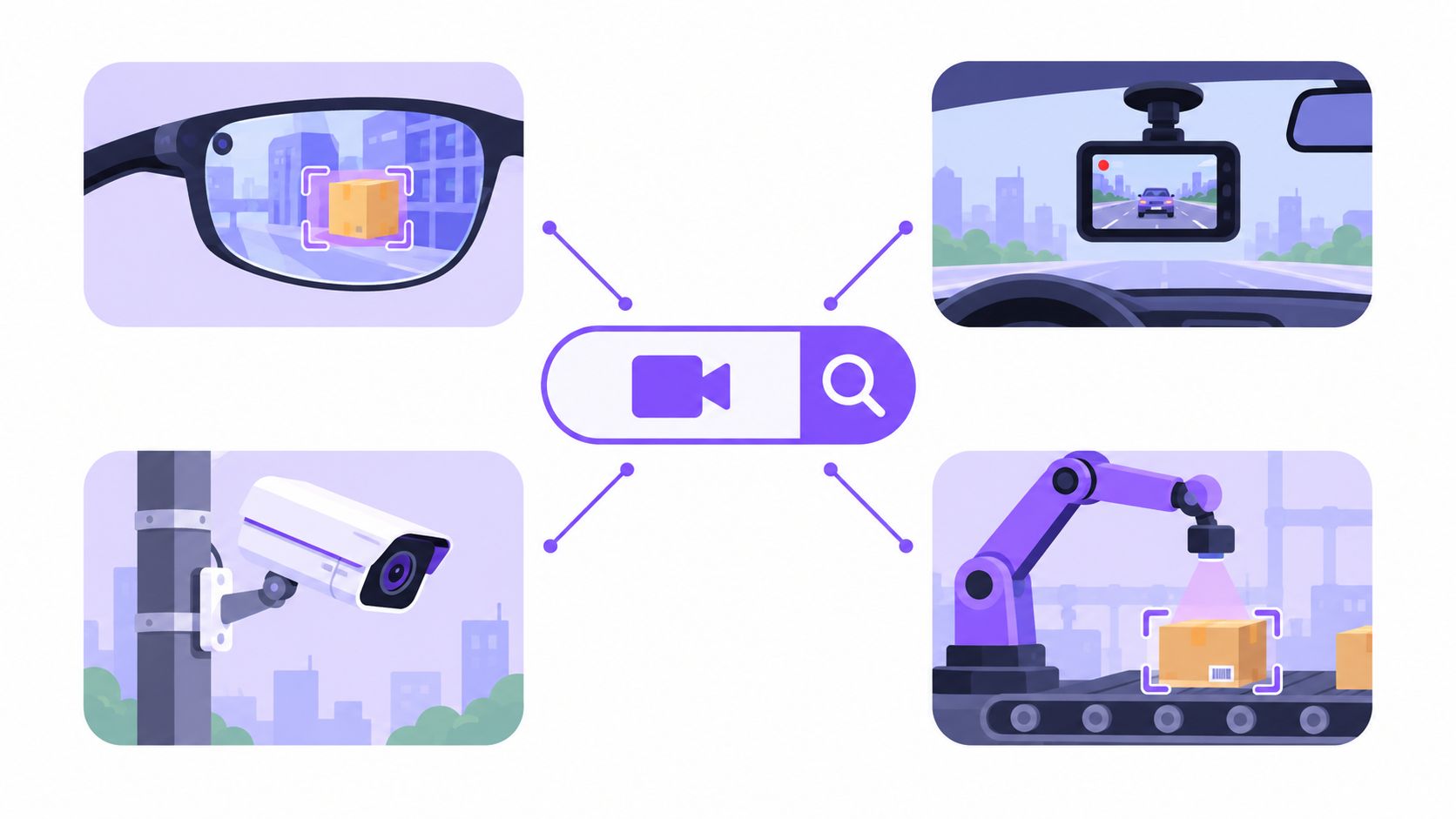
A post-production editor may type “the close-up of the athlete smiling after the finish” instead of remembering a filename. Semantic search in tools such as Adobe Frame.io is designed to locate footage by meaning, spoken content, visual elements, and camera movement, as described in Adobe's post-production discussion. The practical gain is creative time. Editors can find several candidate moments, compare them, and make the final decision themselves.
Advertisement video edition
An advertising team often searches for combinations rather than isolated objects: a product in use, a hand opening packaging, a customer reacting, or a camera move that matches a planned transition. Text-to-video finds the broad set. Image-to-video can locate visually similar product framing. Audio search helps find the clean take of a spoken line or the version with a particular sound bed.
The workflow works best when retrieval and editorial review stay separate. Search narrows the library, while the editor checks continuity, rights, brand placement, framing, and emotional tone. A system that returns a plausible image but the wrong surrounding action still creates avoidable work.
Vision and audio for robotics
Robots operate in environments where a single camera frame rarely explains the task. Vision can show an object on a work surface. Audio can reveal a warning, impact, or human instruction. Action and sensor state can indicate whether the robot was moving, waiting, or recovering from an error.
A memory query might ask for “the last time the gripper slipped while the motor sound changed.” That query is more useful than a request for every frame containing a gripper because it connects the visual event with an auditory and operational cue. The same principle applies to autonomous driving, where a dashcam system may need to retrieve a near miss together with braking sound, steering behavior, and road context.
Dashcam, CCTV, and surveillance
A dashcam operator can search for “the point where the vehicle stopped beside the construction barrier while a horn sounded.” A CCTV integrator can ask for “a person entering the storage corridor after the door alarm.” Video surveillance teams can then review a small set of relevant segments instead of manually scanning every camera timeline.
Natural-language footage search is gaining attention in security, but maturity remains a buying concern. A 2025 security-sector survey rated suitability at 3.92 and technical maturity at 3.2, according to coverage of natural-language surveillance search. Those ratings support a candid deployment stance: test messy footage, overlapping audio, long retention windows, and edge or offline conditions before promising investigators an effortless search experience.
Reverse and clip-to-source search creates another practical route. Teams working with fragmented social video need to find original uploads, duplicates, partial edits, multilingual overlays, and reused footage. Revideo's video search coverage highlights the wider move toward combining transcripts, chapters, community signals, and multimodal cues, rather than relying on a clean title or a single screenshot.
Integrating a Search Layer into Your Workflow
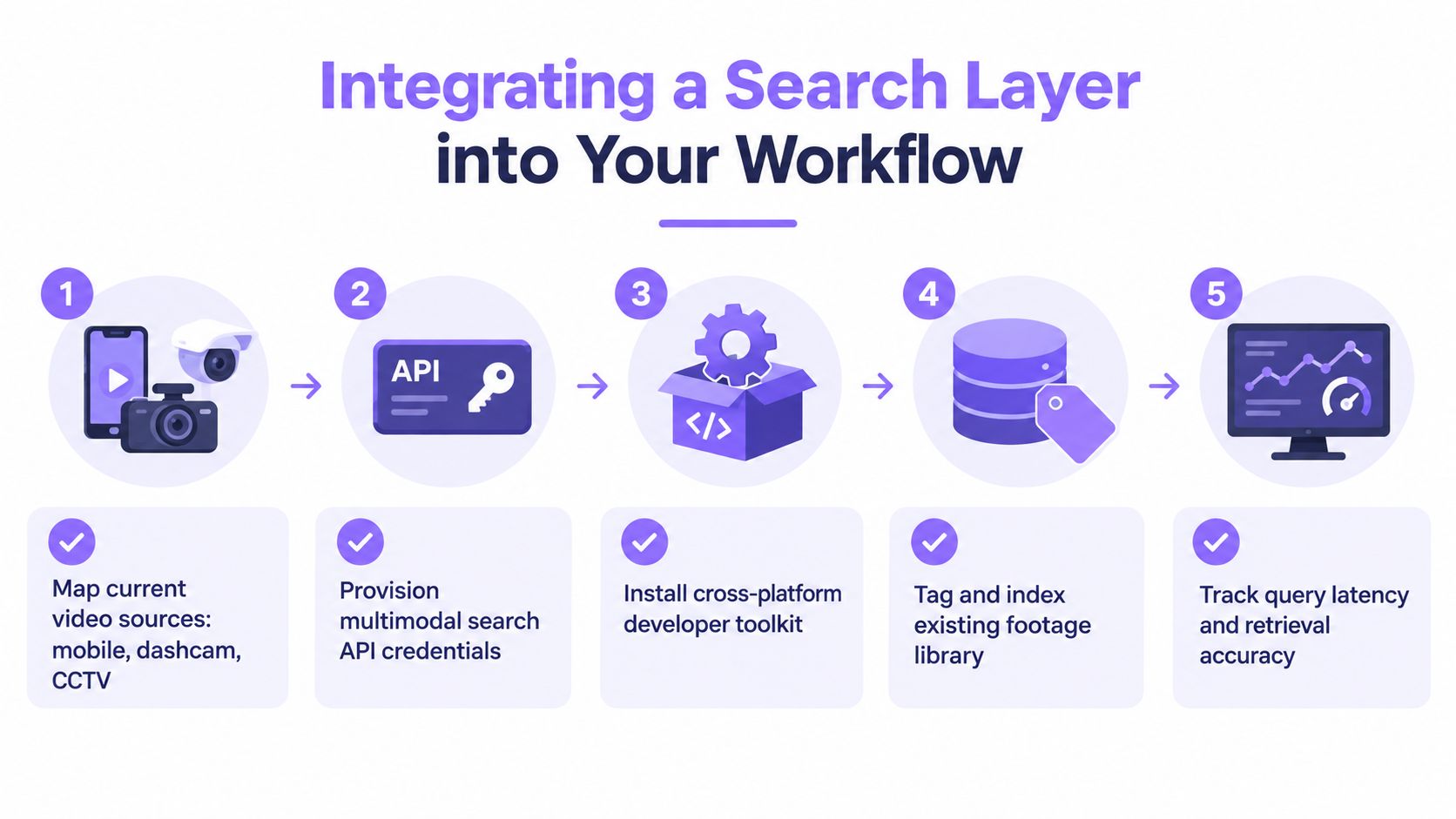
Start with the devices, not the model. Inventory the mobile app, smart glasses, dashcams, GoPros, CCTV feeds, robotics cameras, microphones, and sensor sources. Record what each device can capture, when it loses connectivity, how long it retains media, and which users need access to historical context.
V-Modal AI is one option for teams evaluating this layer. Its platform provides multimodal video, image, audio, and spatial indexing and retrieval, with query modes for text-to-video, image-to-video, voice-to-audio, and environmental-state-to-video. Its native Kotlin Android SDK, Flutter SDK, signed streaming URLs, and chunked multipart upload utilities are positioned for mobile, smart-glasses, robotics, edge computing hubs, and IoT camera integrations.
A deployment checklist
- Audit sources: Map mobile, dashcam, CCTV, robotics, and wearable inputs.
- Define retrieval intents: Write real queries for visual events, audio cues, combined evidence, and environmental states.
- Choose locality: Decide what must work offline, what can use a nearby edge hub, and what may be archived remotely.
- Test retrieval thoroughly: Measure Recall@K, review time, timestamp alignment, false positives, and failure behavior on noisy footage.
- Protect operations: Add resumable media handling, retention controls, access boundaries, monitoring, and a human verification step.
Deployment advice: Don't judge an edge memory layer by a polished demo. Judge it by whether a tired operator can find the right moment in noisy, disconnected, long-running footage.
The strategic shift is from storing recordings to maintaining a searchable physical memory. Video, multimodal audio, action history, and environmental state belong in the same user experience, even when hardware and software vary underneath. Teams that evaluate those signals together can reduce manual scrubbing without pretending that retrieval is already perfect.
V-Modal AI provides a Search Layer for Physical AI with multimodal video and audio search, continuous memory, and SDK support for mobile and edge-connected systems. Use it to evaluate natural-language and visual retrieval across robotics, smart glasses, dashcams, CCTV, and other ambient video sources by visiting V-Modal AI.