AI Video Analysis: The Physical AI Search Guide
A security operator hears an impact in a CCTV recording, a fleet manager needs the moment a driver looked away from the road, and a robotics engineer wants to know when a gripper lost contact with a package. The footage exists, but finding the relevant moment can still mean scrubbing through hours of recordings, switching between camera views, and guessing at timestamps.
That gap defines modern AI video analysis. Recognizing a person, vehicle, or object is only the first step. The harder problem is turning visual streams, audio, and sensor history into searchable memory that a mobile app, robot, smart-glasses system, or surveillance workflow can query when it needs evidence.
Table of Contents
- The Challenge of Scrolling Through Hours of Footage
- Recognition is not memory
- Market Growth and the Evolution of Visual Search
- From pixels to multimodal systems
- Why visual search is the next layer
- Understanding Multimodal Fusion for Robotics
- Audio changes what video means
- Physical AI needs searchable state
- Edge-First Architecture for Real-Time Systems
- Cloud processing
- Edge processing
- Integrating Search Layers into Mobile Apps
- Start with the user journey
- Kotlin integration
- Flutter integration
- Test the failures first
- Deploying Search for Surveillance and Dashcams
- Dashcam and connected fleets
- CCTV and video surveillance
- Overcoming Temporal Precision Challenges
- Why sampling misses the moment
- Design for reviewable uncertainty
The Challenge of Scrolling Through Hours of Footage
A robotics team can have several camera feeds from one test run, plus microphone recordings and sensor logs. After an incident, the engineer usually starts with a rough time estimate, opens the files, and scrubs backward and forward until something looks relevant. The same workflow appears in fleet operations, security control rooms, and advertisement video editing. Recording is easy. Retrieval is the bottleneck.
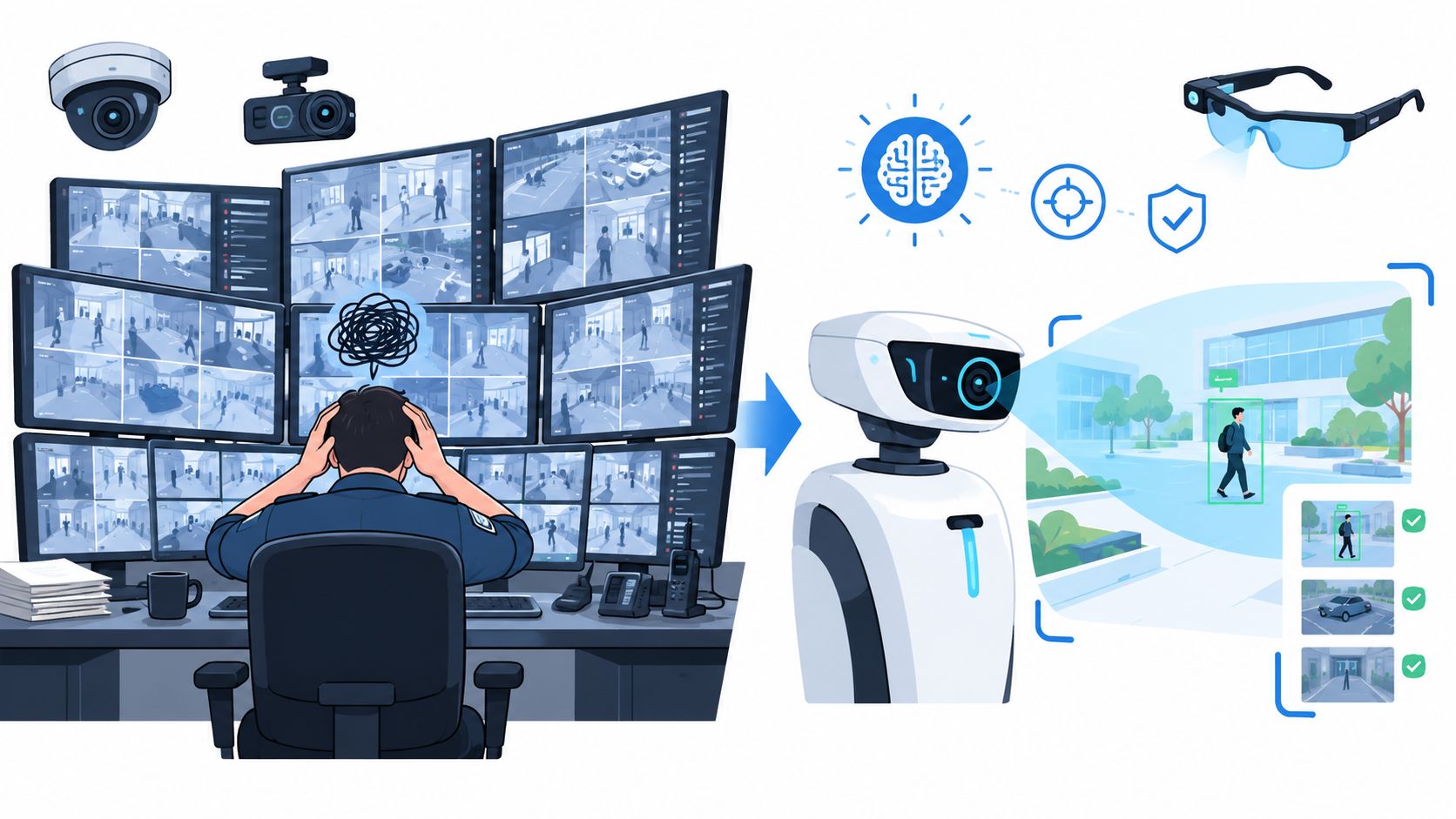
Object detection has made isolated recognition practical. A system can identify a person, a car, a pallet, or a hand in a frame. That doesn't answer the operational question: When did the person pick up the pallet, what did they say immediately before it, and which camera captured the handoff?
Recognition is not memory
A detector labels what appears in a frame. A searchable memory layer connects that observation to time, sequence, sound, and surrounding context. Those are different engineering problems.
A useful search request might be:
- Visual event: Find the moment a worker opens the side gate.
- Audio event: Find the loud impact followed by a shouted warning.
- Cross-modal event: Find when the robot stopped after a person called its name.
- Visual comparison: Find clips where the same package appears near the loading bay.
- Editing request: Find every usable shot where a product is visible without an obstruction.
The system doesn't need to understand everything equally well. It needs to return a narrow, reviewable segment that a person or downstream system can validate.
Practical rule: A video AI project should be judged by how quickly it retrieves useful evidence, not only by how many objects it labels.
This distinction matters even more for Physical AI. A robot can't rely on a remote operator to search a cloud archive every time it encounters an unfamiliar state. Smart glasses need relevant history while the wearer is moving. A GoPro or dashcam may collect valuable evidence where connectivity is intermittent. CCTV operators need an answer tied to a timeline, not another unsearchable file.
A search layer also changes debugging. Instead of asking why a model missed a frame, engineers can inspect the surrounding video, audio, and device state together. That makes it easier to separate a perception failure from a timestamp failure, a bad camera angle, or missing context.
Market Growth and the Evolution of Visual Search
A warehouse camera can recognize a pallet, a worker, or a forklift in individual frames. The harder job starts when an operator asks, “When did that pallet move, and what happened immediately before it?” AI video analysis is shifting from frame-level recognition toward searchable memory, which explains the commercial momentum behind the field.
The global market is projected to reach US$ 7.4 billion in 2026 and US$ 51.1 billion by 2033, implying a 31.8% CAGR. A separate estimate places it at US$ 20.75 billion in 2025 and US$ 27.64 billion in 2026, representing 33.2% year-over-year growth, according to Persistence Market Research's AI video analytics market outlook.
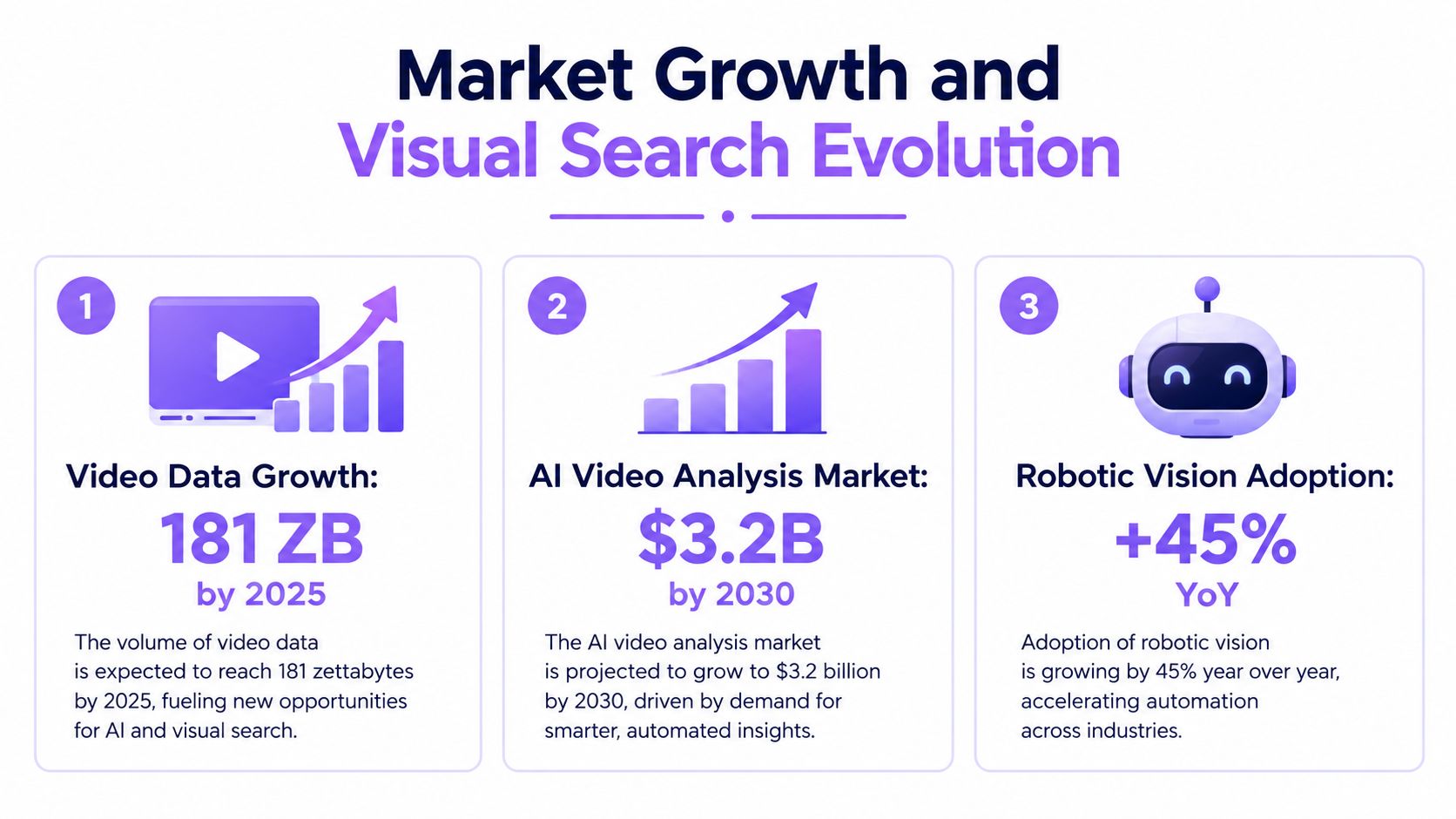
These projections reflect adoption across retail, industrial monitoring, media workflows, autonomous systems, and connected devices. North America was the largest regional market in 2024, while Asia-Pacific is expected to grow fastest. For practitioners, the implication is practical: teams will need storage and indexing systems that preserve searchable events, not only models that label live frames.
From pixels to multimodal systems
Computer vision has progressed from detecting edges and simple shapes to supporting real-time recognition. Early neural-network experiments in the 1950s addressed basic visual features. Larry Roberts' MIT work in the early 1960s, published in 1965, became a landmark in computer vision. Optical character recognition brought early commercial use in the 1970s, larger online image datasets supported facial-recognition programs in the 1990s, and the Viola-Jones model in the early 2000s advanced real-time face detection, as documented in this computer-vision history review.
Recognition is only the first layer. A deployed system still has to attach timestamps, track identities across frames, retain surrounding context, and return a short evidence window without forcing an engineer to inspect hours of footage.
Why visual search is the next layer
The useful query is no longer only “what is visible?” It is “which moment answers my question?” A dedicated search layer converts detections, transcripts, sensor events, and device state into retrievable operational history.
That distinction matters for Physical AI. A mobile robot or wearable device cannot depend on a remote operator searching a cloud archive whenever it encounters an unfamiliar state. Edge processing can produce local events, while a separate memory layer organizes them for later retrieval, debugging, and validation. Standard cloud processing may recognize objects accurately yet still leave the evidence difficult to find when connectivity is limited or response time matters.
Visual recognition produces observations. Visual search makes those observations usable memory.
Understanding Multimodal Fusion for Robotics
A warehouse robot does not read the world as a clean stream of frames. It sees a package, hears a motor pitch change, measures depth, pulls in motion data, and tracks people moving through the same aisle. If each signal stays in its own pipeline, the result is fragmented evidence and slow debugging.
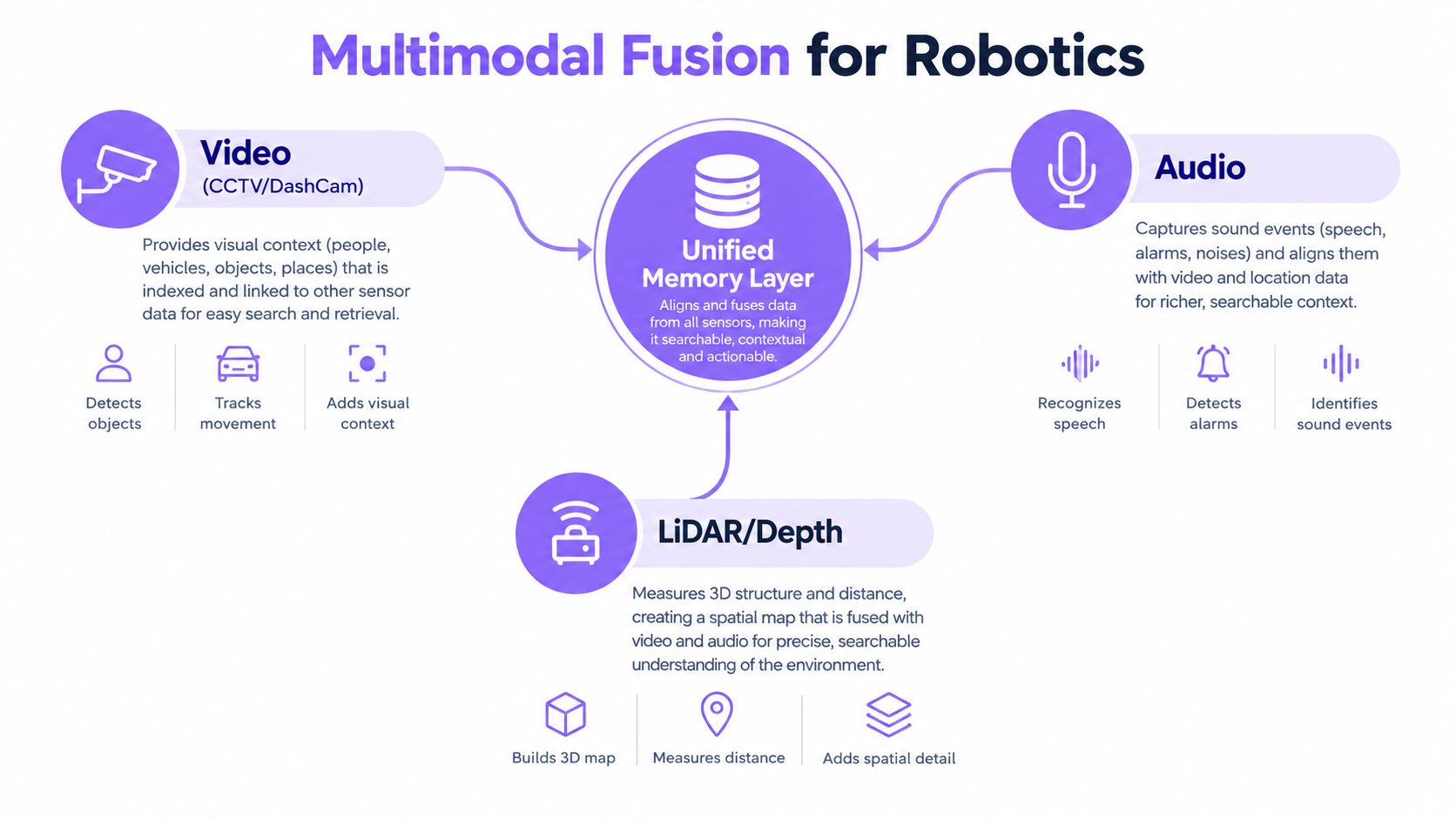
A multimodal memory layer has to do more than collect inputs. It needs a single clock for every event, so an engineer can ask for the moment a package slipped after the conveyor noise changed, then pull the matching video, audio, and depth data without hunting across separate systems. In practice, that means hardware PTP sync at the sensor edge and a unified nanosecond epoch stored with each event record. That timestamp discipline matters more than another layer of model output.
Audio changes what video means
Video may show a robot turning toward a person. Audio can tell you whether that person gave a command, shouted a warning, or caused an unexpected noise. In one medical and robotics example, researchers extracted video frames and speech separately, then combined a 3D CNN for video with a CRNN for speech through a multimodal fusion layer. Another robotics dataset paper combines WiFi sensing, video, and audio for activity recognition, with audio adding context around the activity.
These fusion patterns are useful for Audio for Robotics because sound often carries evidence outside the camera's field of view. A motor's abnormal noise, a verbal instruction, glass breaking, or a collision can narrow a search even when the visual signal is unclear.
Physical AI needs searchable state
Traditional media workflows focus on playback, editing, captions, and distribution. Robotics and Physical AI need historical state that can be queried against actions, environments, and sensor changes.
The difference shows up in the search target. Media teams want the shot. CCTV operators want the incident. A robot team wants the sequence that led to the reaction, including the sensor state before it moved.
| System | Primary question | Useful memory |
|---|---|---|
| Media content | Which shot contains the product or speaker? | Visual moments, speech, scenes |
| CCTV | When did a person enter or an impact occur? | People, sounds, time segments |
| Robotics | What changed before the robot reacted? | Video, audio, depth, actions |
| Smart glasses | What did I just see or hear? | First-person context and recent events |
A unified stack does not remove perception errors. It does reduce the number of disconnected searches an operator has to run. The same event can be retrieved through text, an image example, a sound, or an environmental state. That is the basis for a Search Layer for Physical AI, where memory supports both human investigation and machine action.
Causal reasoning is still a separate problem. Current systems can identify objects and interactions more reliably than they can explain why a multiparty event happened, what a person intended, or how cultural context changes interpretation. Recent coverage of contextual video intelligence points to that gap. A product team should treat “what happened next?” as a harder requirement than “what appears in the frame?”
Edge-First Architecture for Real-Time Systems
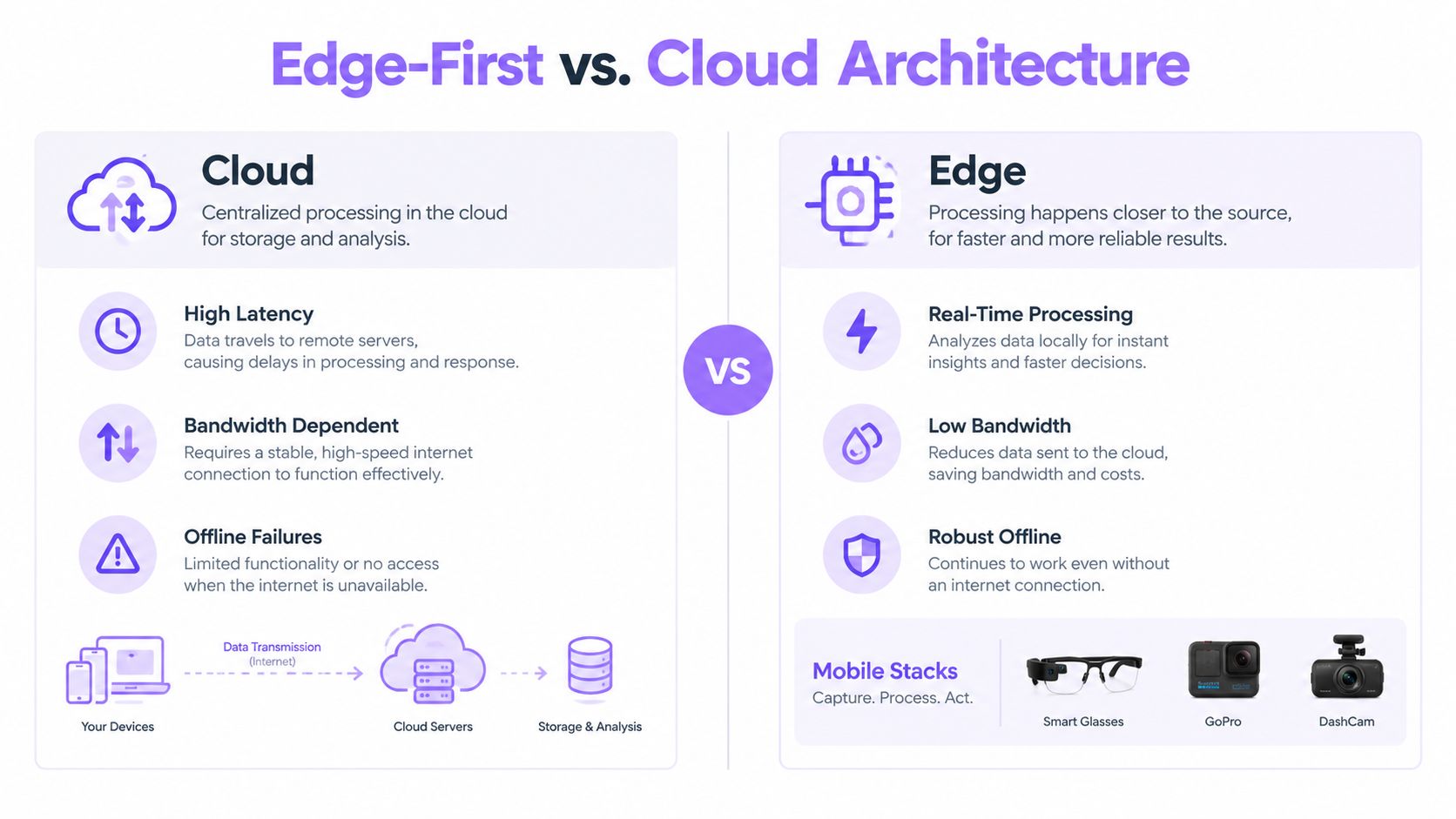
Cloud processing is convenient for large archives, centralized governance, and heavyweight analysis. It becomes less attractive when a camera is mounted on a moving vehicle, a robot must react before a network round trip completes, or a pair of smart glasses is operating in a crowded environment.
The practical choice isn't cloud versus edge in absolute terms. It's deciding which work must happen beside the sensor and which work can wait for a central service.
Cloud processing
A centralized design simplifies fleet-wide management. Teams can aggregate recordings, update models in one place, and give investigators a broad search surface. It works well for archived CCTV, media libraries, and workflows where a delay is acceptable.
The weaknesses appear at the device boundary:
- Latency: A live robot or dashcam may need a local response before the upload completes.
- Bandwidth: Continuous high-resolution video is expensive to move and store remotely.
- Connectivity: Tunnels, warehouses, roads, and field sites can interrupt service.
- Privacy: Some environments shouldn't transmit raw audio or video by default.
Edge processing
An edge-first design keeps time-sensitive interpretation near the camera, phone, smart glasses, GoPro, dashcam, or robot computer. It can preserve useful event context locally, then synchronize selected material when a connection becomes available.
That approach introduces its own pain. On-device hardware has limited memory, thermal headroom, battery capacity, and storage. Developers must handle interrupted uploads, clock drift, corrupted files, model updates, and playback while processing continues. A system that works on a desktop GPU can still fail on a phone because it blocks the UI or exhausts memory during a large upload.
Engineering trade-off: Put urgent detection and compact memory close to the sensor. Push broad investigation and long-term aggregation to the cloud when the network and privacy policy allow it.
For mobile stacks, the most resilient pattern is usually hybrid. A Kotlin Android application can monitor local capture and event state, while a Flutter layer can share search and playback flows across Android and iOS. Smart glasses can expose a lightweight query interface while the nearby phone or edge hub handles heavier work. The architecture should degrade gracefully instead of treating offline operation as an exception.
Integrating Search Layers into Mobile Apps
Mobile developers don't need to turn an app into a full video-processing workstation. They need to make capture, upload, query, and evidence playback reliable under constrained conditions. The implementation should protect the user interface, preserve timestamps, and make failures recoverable.
Start with the user journey
Define the search request before choosing the SDK boundary. A fleet app might accept “show hard braking near the depot,” while a smart-glasses app might accept a voice request about an object seen moments ago. A media app may use an image reference to find similar shots for advertisement video edition.
Then separate the flow into four responsibilities:
- Capture and consent: Record the source, permissions, device clock, camera identity, and audio state.
- Transfer: Use resumable or chunked uploads so a temporary network loss doesn't restart the entire file.
- Query: Send natural-language, image, voice, or environmental-state intent to the search service.
- Playback: Open the returned time segment immediately, with enough surrounding context for verification.
Kotlin integration
A native Android stack should keep capture and upload work off the main thread. Kotlin coroutines are a natural fit for coordinating recording state, local queues, retry policies, and cancellation when a user leaves the screen.
Use a local database for upload state rather than relying on an in-memory queue. Store the media identifier, capture start time, duration, upload parts, retry status, and the user's search request. The app should be able to resume after a process restart and show whether the result is local, synchronized, or still pending.
Avoid loading entire recordings into memory. Stream files from storage, display progress from completed chunks, and keep search results as lightweight metadata until the user opens a segment. That design matters for dashcam clips, GoPro imports, and long CCTV exports.
Flutter integration
Flutter works well for shared search interfaces, result cards, filters, and timeline playback. Keep platform-specific capture, background transfer, Bluetooth, and hardware access behind a native bridge. Don't force one abstraction to control every camera and sensor.
A useful boundary looks like this:
- Flutter: Query composition, result presentation, annotations, and navigation.
- Kotlin or Swift: Camera control, local persistence, background transfer, and device permissions.
- Edge service: Local indexing, sensor coordination, and offline retrieval.
- Remote service: Archive search, fleet-wide history, and cross-device access.
Test the failures first
Mobile video applications fail in ordinary conditions, not only under exotic loads. Test interrupted uploads, low battery, revoked microphone access, full storage, camera rotation, missing audio, device clock changes, and a user launching a second search before the first finishes.
Natural-language search also needs a fallback. If “the package fell after the warning sound” returns nothing, show nearby events, available audio markers, or a broader visual query rather than an empty screen. The best interface makes uncertainty visible and gives the operator a fast way to refine intent.
Deploying Search for Surveillance and Dashcams
A control room operator rarely wants a summary of an entire recording. They want the segment containing a person, a vehicle, a scream, a collision, or a door opening. Practical systems already mark people and sound events such as speech or screams on a timeline, as described in this accident-detection paper covering dashcam and CCTV analysis.
That timeline changes the review workflow. An operator can begin with an event marker, inspect the surrounding footage, compare another camera, and export only the relevant evidence. The system doesn't replace judgment. It removes the least valuable part of the job, manually scanning irrelevant material.
Dashcam and connected fleets
A fleet application can combine forward-facing road video with driver-facing footage, audio alerts, and location context. On-device systems can detect distracted driving, drowsiness, smoking, and mobile-phone use, then issue an in-cab alert while notifying an operations team. AFTECH describes this edge-oriented dashcam pattern, including HD 1080p recording, infrared night vision, and 4G dashboard access in its AI dashcam overview.
The search requirement appears after the alert. A manager may need every clip associated with a driver behavior, a road event, or a specific date and time. Mobile-first retrieval is useful here because the person reviewing the event may be in the field, not at a desktop workstation.
CCTV and video surveillance
CCTV systems benefit from queries that combine visual and auditory clues. “Find the person who entered after the impact” is more useful than a person count alone. “Show the camera view before the alarm” requires temporal context and reliable synchronization across feeds.
Robotics teams face a similar pattern during incident review. A stopped robot, an unexpected sound, and an object left outside its expected position may belong to one event. Searching those signals together can shorten diagnosis, provided the system returns evidence that engineers can replay and validate.
The main pain points remain familiar:
- False positives: Alerts create review work if thresholds are too aggressive.
- Timestamp drift: Separate cameras and sensors may disagree about event order.
- Poor audio: Wind, road noise, and distance reduce sound reliability.
- Privacy controls: Retention and access policies must shape the design.
- Evidence handling: Exported clips need clear provenance and permissions.
Overcoming Temporal Precision Challenges
A video can be correctly labeled and still be operationally useless. If a search returns the right scene but misses the exact moment when a hand releases a tool, a vehicle makes contact, or a person crosses a boundary, the operator must repeat the investigation manually.
Long-video analysis is difficult because models must preserve context across extended temporal dependencies. The LVBench benchmark uses videos with an average length of 4,101 seconds and evaluates long-term memory, comprehension, and information extraction. Gemini-2.5-Pro reached 67.4 on the benchmark, while humans averaged 94.4, showing that long-form understanding still has a substantial gap.
Why sampling misses the moment
Many systems inspect selected frames instead of every frame. That saves compute, but a brief action between samples can disappear. The trade-off is especially serious in security review, sports footage, manufacturing, and robotics logs, where the decisive movement may last only seconds.
Temporal localization is therefore a separate capability from recognition. In the Ego4D Point of No Return challenge, the SViT technical report defines the task as finding the key frame where an object changes state and reports an absolute temporal localization error of 0.656 on the test set, as documented in the technical report.
Design for reviewable uncertainty
Teams shouldn't promise frame-perfect retrieval before testing the actual camera, motion, lighting, and audio conditions. Build an evaluation set from real incidents and measure whether returned segments let a reviewer confirm the event quickly.
A solid workflow should:
- Return a tight candidate segment plus nearby context.
- Preserve the original recording for verification.
- Show whether the result came from visual, audio, or fused evidence.
- Allow the reviewer to correct the time range.
- Record the query and selected evidence for later debugging.
Long-form systems are improving, but current reviews note that models remain stronger on roughly 30 to 60 minute videos than on multi-hour material, and brief events can still be missed by sparse inspection, as discussed in this analysis of AI video-analysis limitations. The practical answer isn't to send every raw stream to the cloud. It's to build a dedicated search layer that preserves local context, handles multimodal signals, and makes uncertainty visible.
The most useful AI video analysis system is not the one that produces the longest description. It's the one that helps a person or robot retrieve the right evidence at the moment a decision matters.
V-Modal AI offers a Visual Memory Layer for Physical AI with multimodal video and audio search, edge-oriented memory for robotics and mobile devices, natural-language retrieval, and Kotlin and Flutter integration patterns. Visit V-Modal AI to evaluate a dedicated search layer for robotics, smart glasses, dashcams, CCTV, and other physical systems.