What Is CLIP? Image-Text AI Explained for Video and Audio
CLIP (Contrastive Language-Image Pretraining) is a model trained to match pictures with the words that describe them, so both land in one shared space. The related word “clip” also means a time-bounded segment of a longer recording, but that's a different thing from the model.
That distinction matters when a product team wants to search not just a photo, but a moment in a video, a spoken phrase, or an alarm. CLIP can help connect images with text, but it doesn't automatically understand motion, event order, or sound. Product builders need to know where that matching approach fits, and where video, audio, and hardware call for additional capabilities.
Table of Contents
- CLIP in One Paragraph and Its Core Parts
- What a score means
- How CLIP Learns from Image-Text Pairs
- The training loop
- Zero-Shot Recognition Without Retraining
- A practical prompt test
- Extending CLIP to Video and Audio Search
- Matching a scene isn't locating an event
- Where CLIP-Style Search Fits in Physical AI and Media
- Common Pain Points Teams Face with Multimodal Search
- Choosing a Multimodal Search Layer for Your Product
CLIP in One Paragraph and Its Core Parts
CLIP is an image-and-text model designed to place pictures and descriptions in a shared mathematical space. It uses an image encoder to turn a picture into a vector, a list of numbers representing features the model can compare. A text encoder does the same for a caption or label. When an image and a phrase describe similar content, their vectors should sit closer together than unrelated ones.
The name creates a common confusion. A video clip is a time-bounded segment of a longer recording, identified by a start and end timestamp. It can refer to a moment in an existing file, rather than a separate video file. In this article, CLIP means the model, while clip means the media segment.
| Component | What it does | Example |
|---|---|---|
| Image encoder | Turns a picture into a fixed-length vector of numbers | A photo of a dog becomes a list of numbers |
| Text encoder | Turns a caption or label into a vector in the same space | “a photo of a dog” gets its own vector |
| Shared embedding space | Places matching images and texts close together | The dog photo sits near “dog” and far from “car” |
| Contrastive loss | Training signal that pulls true pairs together and pushes mismatched pairs apart | The dog photo is pulled toward its own caption and pushed away from “a photo of a car” |
| Cosine similarity | Scores how close an image vector and a text vector are | Scores are compared across candidates; the highest-scoring label wins, since raw values rarely reach 1 |
What a score means
A similarity score is a relative match, not a certainty stamp. If a warehouse worker asks for “a photo of a hydraulic seal,” the model can compare that phrase with candidate images and rank the closest matches. The highest-ranked result may still be wrong, especially when two parts look alike or the prompt doesn't match the team's vocabulary.
CLIP doesn't choose from a fixed list of labels built into the model. A product builder supplies text candidates, and the model compares each candidate with the image. Its core idea is closeness: images and words that appear related land near one another in the shared space.
How CLIP Learns from Image-Text Pairs
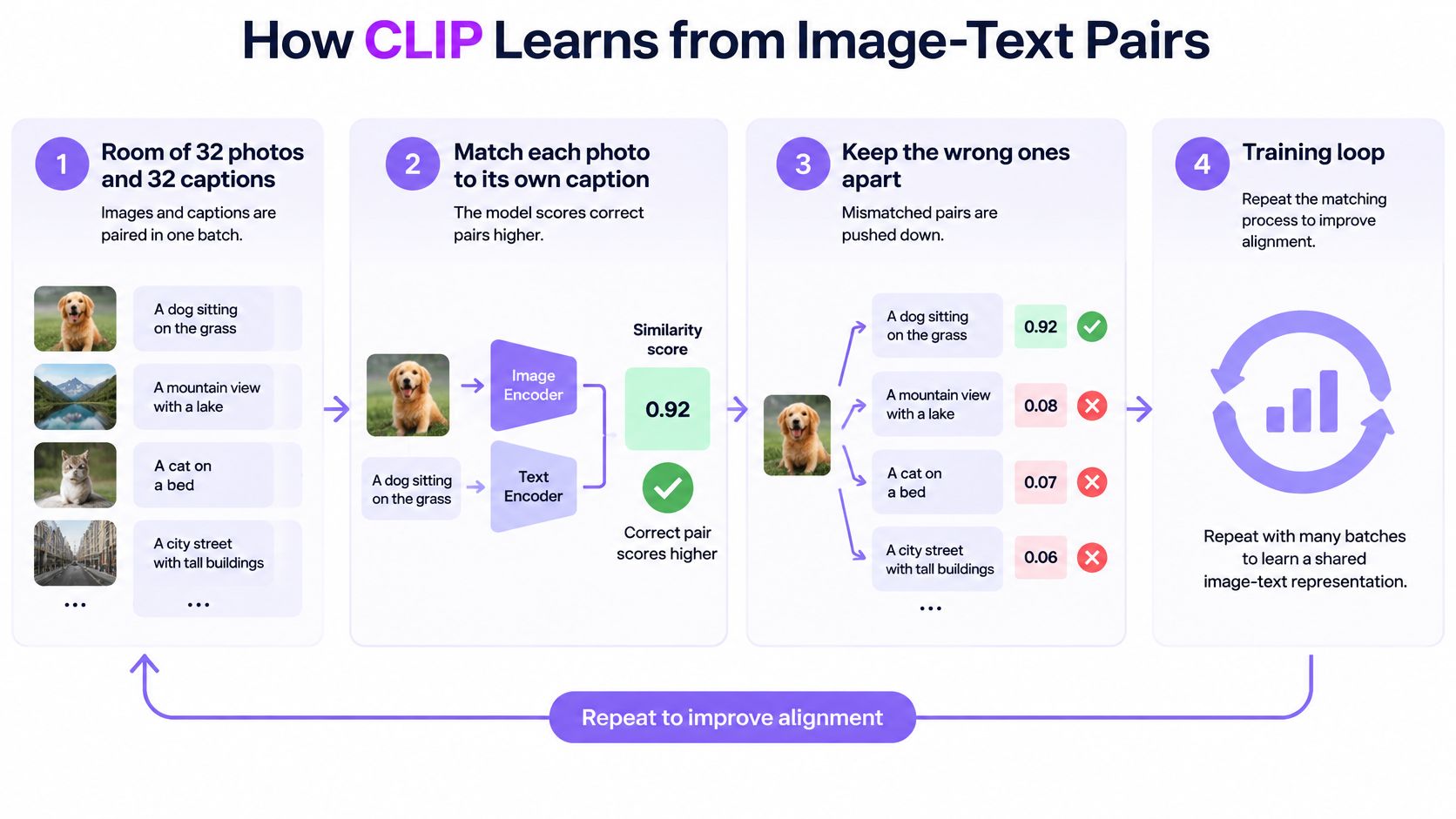
Think of a matchmaking exercise with 32 photos and 32 captions. Each photo has a matching caption somewhere in the room. The model's task is to pair the correct ones, while avoiding plausible but incorrect matches. “A brown dog on grass,” for example, shouldn't be matched with a caption about a car just because both appear outdoors.
The training loop
- Collect paired examples. The training process takes batches of images and their associated text, such as a picture and its caption.
- Encode both sides. The image encoder turns every photo into a vector; the text encoder turns every caption into one.
- Compare every combination. The model scores each image against each caption, creating a grid of similarity scores.
- Reward the right matches. Contrastive loss encourages the correct image-caption pairs along the grid's diagonal and discourages the off-diagonal pairings. The comparison works in both directions, from image to text and from text to image.
- Adjust and repeat. The model updates both encoders and repeats the exercise across many paired examples.
The approach can use image-text pairs already present online as supervision. That avoids the need to manually assign a fixed class label to every training image. It also explains why the captions matter: a caption acts as a description that helps teach the model what a visual match might look like.
The weakness is straightforward. Web captions can be vague, incomplete, or incorrect. If a picture's text doesn't accurately describe it, the model may learn a loose association instead of a dependable one. That can show up later as a confident-looking match that makes little sense in the product's actual setting.
CLIP learns by contrast, not by memorizing labels. Each batch teaches it what a match looks like and what a mismatch looks like.
Zero-Shot Recognition Without Retraining
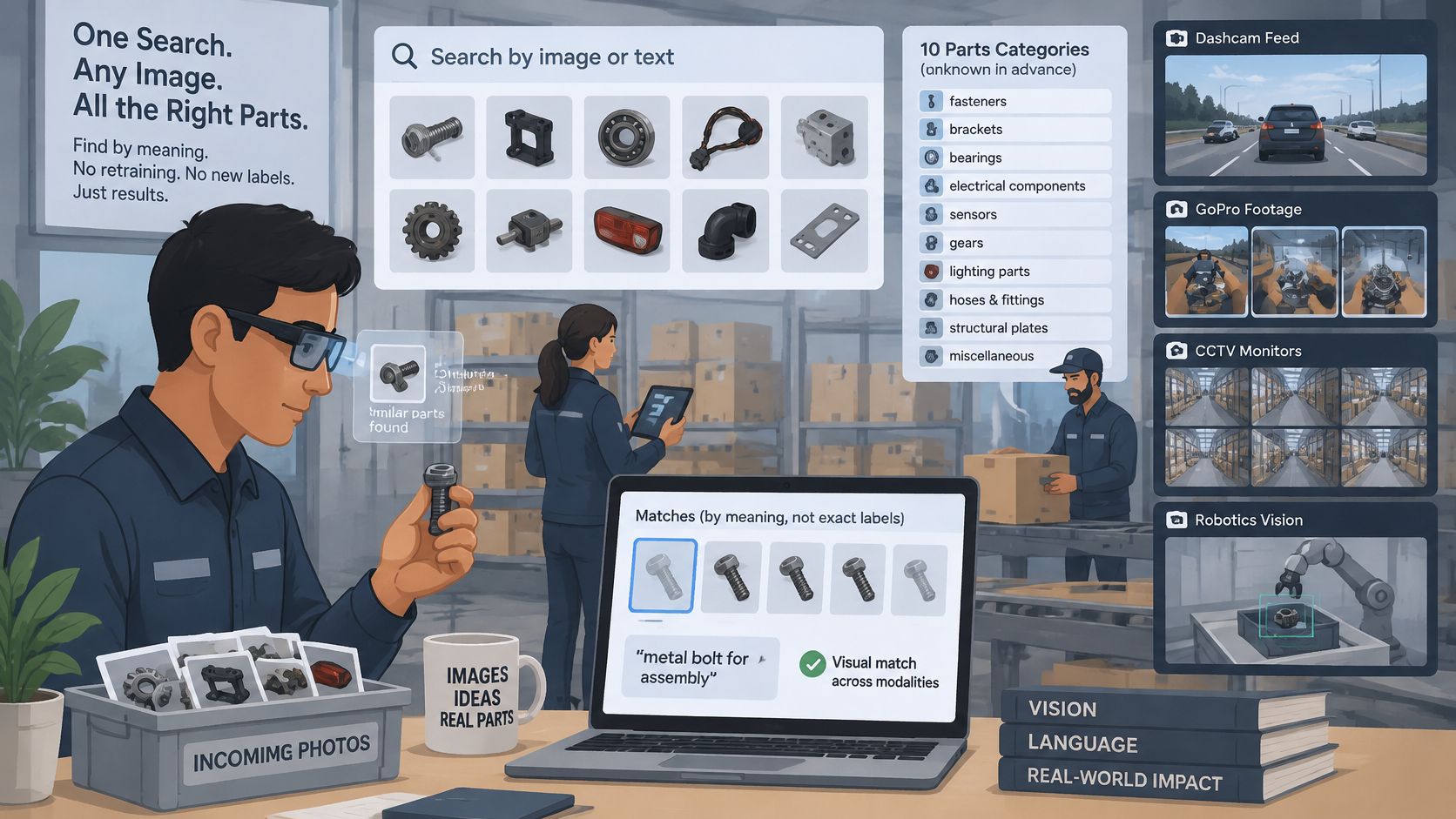
Suppose a warehouse team wants to sort photos into 10 parts categories that the model wasn't trained to recognize as a fixed classification task. A CLIP-style system can compare each image with a set of category descriptions, without retraining the model for those categories. That's called zero-shot recognition: the system applies its learned image-text matching to new labels supplied at use time.
A practical prompt test
- Write a description for each category. Use phrases such as “a photo of a hydraulic seal” rather than relying on a short internal code.
- Encode the descriptions. Turn each candidate phrase into a text vector.
- Compare an incoming image. The image encoder creates a vector for the part photo.
- Rank the candidates. Choose the phrase with the strongest similarity score, then check whether it's correct.
The wording can change the result. “A photo of a gasket” may rank better than the bare label “gasket,” because the longer prompt provides context that better resembles the phrasing used during training. Teams can also test multiple prompt templates and average their representations, rather than trusting one wording.
This is useful when labeled examples are scarce, as can happen with spare parts, surgical tools, or agricultural pests. But zero-shot matching has limits. It may struggle to distinguish two visually similar parts, count multiple objects, or interpret relationships such as “the tool to the left of the box.” Results also depend on how people phrase the candidate labels.
Check the prompts before relying on them. Put together a hand-checked set of 100 to 200 images, including confusing examples and poor lighting. Compare the model's ranking with the expected result, revise the descriptions, and test again. SigLIP is a widely used successor that follows the same image-text idea, but it isn't a settled default for every 2026 project. Test model choices on the same image set before selecting one for production.
Extending CLIP to Video and Audio Search
CLIP scores still images, not a video's complete timeline. A video-search system can sample frames and compare each with a text query, but judging one frame at a time loses motion, sequence, and duration. A frame may show a person at a door without revealing whether they opened it, or whether an alarm sounded beforehand.
That makes a question like “person opens the door after the alarm” more than a scene-matching problem. The system must find the alarm, locate the door-opening event, preserve their order, and return a useful start and end time for the result.
Matching a scene isn't locating an event
A video clip can be represented as a start and end timestamp within the original recording. Temporal localization asks whether a system identified both the right event and the interval in which it happened. One way to evaluate the interval is temporal Intersection over Union, or tIoU: the time shared by the predicted and correct intervals divided by the total time covered by both. A result that finds the right scene but includes too much unrelated footage can score poorly.
Audio needs its own path. Original CLIP matches images and text; it doesn't directly understand sounds. Audio-language models in the CLAP style can compare sound and language, while speech-to-text systems can make spoken words searchable as transcripts. Those approaches aren't interchangeable: an alarm, running water, or machinery may matter even when nobody says anything.
| Media type | Fit for CLIP-style matching | Main limitation | Practical handling |
|---|---|---|---|
| Still images | Strong: direct image-text pairs | Fine counting and left-right relations are weak | Test prompts on a hand-checked set before use |
| Video frames | Good for objects and scenes | Motion, order, and duration are lost | Sample frames and keep each timestamp |
| Video actions and events | Weak on its own | Needs temporal boundaries and ordering | Add a temporal model and score start and end accuracy |
| Environmental audio | Moderate with audio-language variants such as CLAP-style models | Sounds aren't always describable in words | Keep audio timestamps on the same clock as video |
| Speech in video | Partial through transcript text | Transcript errors and no tone or emphasis | Pair a transcript index with the frame timeline |
Practical rule: Keep frame and audio timestamps tied to the original media clock. Otherwise, a search result may combine a sound from one moment with an image from another.
CLIP-style matching is a useful first stage for finding relevant scenes, but video timing and sound need additional methods. A multimodal search platform can return time-based video results by combining frame and contextual signals. For example, V-Modal's visual video search SDK is one option developers can evaluate when building that kind of product.
Where CLIP-Style Search Fits in Physical AI and Media
A Physical AI stack has to connect perception to the surrounding world, not only retrieve media from an archive. One useful way to think about it is in four layers: sensing from cameras, microphones, and device sensors; perception that identifies what might be happening; memory that retains timestamped events; and action, where the robot or device decides what to do. CLIP-style matching can contribute to perception, but it isn't the whole stack.
Robotics places more weight on real-time perception and decisions. Media editing and CCTV, by contrast, often focus on finding the right moment in a recording. The design can share an image-text matching idea while requiring different response times, privacy controls, and evidence trails.
A 2026 U.S. Physical AI market analysis reported that on-device AI represented 50.9% of the U.S. Physical AI market by deployment, and computer vision represented 42.8% of the market by technology. For product builders, the practical implication is that a local memory layer can help devices keep working when a network connection is intermittent. Local processing still has to fit within limits on battery, storage, heat, and compute.
| Use case | Media | Typical query | Top requirement |
|---|---|---|---|
| Physical AI and robotics | Camera and depth streams with device state | “cup on the left shelf” | Real-time response and on-device operation |
| Vision for robotics | Onboard RGB frames | “red box near the door” | Low latency and offline operation |
| Audio for robotics | Microphone streams | “alarm or running water” | Sound event timing and noise robustness |
| Advertisement video editing | Long campaign footage and versions | “product close-up with music” | Precise retrieval across many cuts |
| Dashcam | Road-facing video with GPS and G-force data | “hard braking near the intersection” | Event timestamps linked to telemetry |
| CCTV and video surveillance | Fixed-camera recordings | “person entering the loading bay after 22:00” | Audit trail, access control, and retention |
| Smart glasses | First-person video and audio | “where I left my keys” | Battery life, on-device memory, and privacy |
| GoPro and action cameras | Wearable action video | “surfing jump clips” | Fast export of short segments |
For vision in robotics, a robot may need to find a red box near a door while navigating around other objects. Audio for robotics is different: a microphone query for an alarm or running water calls for sound-event timing and noise handling, not just an image match.
An ad editor could search a library of campaign versions for a product close-up set to music, while a dashcam operator may need to connect hard braking with GPS and G-force records. CCTV teams may need a query such as “person entering the loading bay after 22:00” and an auditable record of who retrieved the footage. Smart glasses and GoPro-style devices add constraints around privacy, battery, and quick export. The same matching concept can serve all of these products, but latency, privacy, and audit requirements shape the system around it.
Common Pain Points Teams Face with Multimodal Search
A search system can return plausible results and still miss the moment a team needs. That doesn't automatically mean image-text matching is a poor fit. More often, the team hasn't yet tested how well the system handles its footage, language, timing, and device limits.
- Long recordings require manual scrubbing. Sample by scene change and keep timestamps so reviewers can jump to relevant moments.
- Labels don't match staff vocabulary. Write candidate prompts using the words operators and editors use.
- Fast events fall between sampled frames. Increase the sampling rate for quick actions rather than processing every recording at maximum detail.
- Audio and video drift out of sync. Anchor both streams to one media clock.
- CCTV and dashcam searches produce false positives. Tune thresholds for each camera and review results in batches.
- Web-trained models meet different environments. Test on local factory, road, or indoor footage before rollout.
- Glasses and action cameras have limited battery, heat, and storage headroom. Process on-device where practical and transmit only the events the application needs.
- Teams lack ground-truth labels to measure success. Label 200 clips by hand and use them to check whether results are useful.
Privacy belongs in the design, not only in a settings screen. A clip can include recognizable faces, voices, locations, or sensitive behavior, so decide what leaves the device, who can retrieve it, and how deletion works. A privacy-preserving surveillance study reported 85% lower bandwidth use when video was processed locally and only metadata transmitted, compared with conventional cloud offloading. It also described an edge deployment with 100% on-device processing, 91.3% keypoint-detection accuracy, and 20.53 frames per second on 20 CCTV videos.
These challenges are normal for multimodal products. Treat them as design questions to test and manage, not as proof that the search approach has failed.
Choosing a Multimodal Search Layer for Your Product
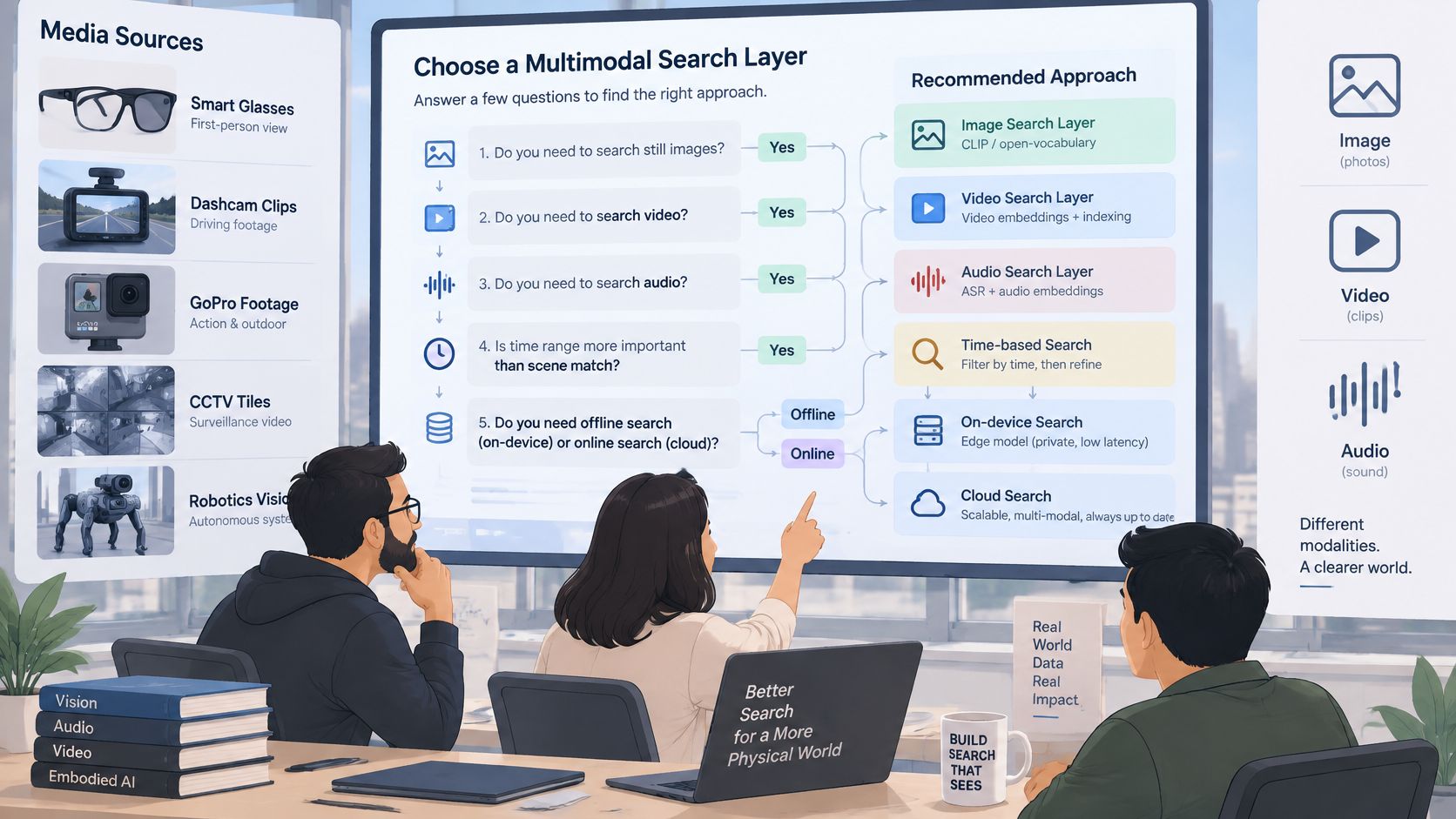
The right search layer starts with the job your product needs to do. Before choosing a model or platform, answer a few practical questions:
- What do you need to search: still images, video, audio, or all three?
- Does the user need a time range, or is a scene match enough?
- Must search work offline or on a phone with a weak connection?
- Who's allowed to see the retrieved footage?
- How long must events remain available for audit?
If the product only searches still images or a visual catalogue, a CLIP-style image model may be enough. If it needs time segments, sound, or offline operation, plan for temporal and audio capabilities as well. A model's ability to match a phrase with a frame doesn't, by itself, prove that it can return a precise event boundary or keep audio synchronized.
A useful pilot is small enough to review carefully, but realistic enough to expose failures. Choose 50 of your own clips, label the moments by hand, and test whether the top results contain the right event within a few seconds. Include the difficult cases: similar-looking objects, poor lighting, noisy recordings, and events that unfold across multiple moments.
Then compare cloud and on-device runs against the same clips and questions. Check the relevance of the retrieved moment, whether timestamps line up, and whether reviewers can access only the footage they're permitted to see. Include the cost of local compute, storage, and battery in the decision rather than treating retrieval quality as the only measure.
For a product that needs both searchable media and device-side memory, V-Modal AI offers a multimodal search API and edge-focused memory layer for video, audio, image, and spatial sensor data. Compare it with other options using the same pilot, privacy, and timing criteria, then visit V-Modal AI to evaluate its SDKs and example code for your application.