Vidio Search Engine: How Multimodal Video Search Works
You've just finished a shift, a drive, or a test run, and someone asks a simple question. When did the forklift stop at the gate? Where did you leave that tool? Which clip shows the product close-up?
You know the answer is somewhere in hours of video. What you don't have is hours to scrub through it.
That's the problem a video search engine is built to solve. Instead of treating a recording as one long file you drag through by hand, it lets a device or app keep a memory layer over what it saw and heard. You ask in plain language, with a picture, or with a sound, and you get back the moment.
People searching for a Vidio search engine often land on two different ideas at once. One is Vidio, the Indonesian streaming service. The other is video search itself, the technology that finds moments inside recordings. Keeping those ideas separate makes the rest of this topic much easier to judge, whether you're building for a robot, a dashcam, CCTV, smart glasses, or an ad library.
Table of Contents
- What Video Search Returns and How Multimodal Search Works
- What multimodal means in practice
- Two recent examples that clarify the category
- Pain Points That Make Manual Video Review Fail
- Where the work breaks down
- Physical AI Stack Compared With Media Content Search
- The two rows that decide most designs
- Robotics, Dashcam and Wearable Search Workflows
- Vision and audio for robotics
- Dashcam, GoPro, smart glasses, and mobile
- CCTV, Surveillance and Ad Editing in Recent Practice
- One event, searched once
- The same move inside an ad library
- Pick Your First Integration Path
- A three step checklist
What Video Search Returns and How Multimodal Search Works
Say a delivery driver returns to the depot and a supervisor asks, "When did the red van stop at the north gate?" The dashcam holds a full morning of driving. Nobody wants the whole file. They want the ten seconds when that van appears, slows down, and stops.
A video search engine returns that exact moment, not the whole recording. You type a description, speak a phrase, or show a picture, and you get a ranked clip with a start time and an end time. Playback jumps straight there.
Think of a librarian for web search. You ask for a topic and the librarian hands you useful pages. Video search works closer to a concierge who has watched the film for you. She doesn't hand you the whole film. She points to the second where the man dropped his keys near the door, even if nobody wrote that moment down in a file name.
What multimodal means in practice
Multimodal sounds technical, but the idea is simple. A recording carries more than one kind of signal at once. There's the picture in each frame, the sound from the microphone, spoken words, and context such as time, place, or weather.
A single-signal search can miss the point. If you only search captions or file names, you'll never find a silent event. If you only search images, you'll miss the alarm, horn, or spoken instruction that explains what happened next. Multimodal search reads video as a sequence of frames with sound and context attached, so one query can draw on the evidence that fits it best.
| Query type | Example input | What comes back |
|---|---|---|
| Text description | 'red delivery van stopping at a gate' | Matching clip with start and end timestamps |
| Image | Product photo | Clips where that product appears |
| Voice | 'glass breaking' | Audio moment and the matching frames |
| Environment state | 'night, heavy rain, wet road' | Segments where those conditions occur |
Read the table by asking what evidence your user has. A fleet manager has words. An editor has a product photo. A security operator may only remember a sound. A test driver may remember rain and a wet road, not the clock time.
Practical rule: Decide first whether your user needs a moment, a short clip, or a whole file. Most operational questions need a moment, and that choice shapes every later decision about devices and storage.
Two recent examples that clarify the category
The 2025 TREC Ad-hoc Video Search evaluation provides systems with short text queries and asks for ranked lists of up to 1,000 relevant video segments from a large corpus. The submissions used several approaches, including language-based expansion, splitting a query by evidence type, reranking with vision and language models, and selective audio retrieval. You don't need those internal details to apply the lesson. One request might need an object in a frame, another a spoken phrase, and another an environmental sound. Segment level results match how people interact with robots, dashcams, GoPros, smart glasses, and phones.
Vidio is a useful contrast, because it's a media catalog, not a search product for your own device footage. According to Google's Vidio case study, Vidio was established in Indonesia in 2014 and by 2023 its catalog contained more than 1 million videos. After adding machine readable VideoObject descriptions, and while publishing about 30% more videos between the first quarter of 2022 and the first quarter of 2023, it saw roughly a threefold increase in video impressions and nearly a twofold increase in video clicks on Google Search within one year. The delivery format didn't have to change. Better descriptions changed discovery.
That's the shared principle, at two scales. A streaming catalog gets found when machines can read what each video contains. A robot or camera gets useful memory when its own recordings can be asked about in the same direct way.
Pain Points That Make Manual Video Review Fail
Manual review fails gradually at first. One person can check one short clip. The work breaks when footage is continuous, devices multiply, and the important event lasts only a few seconds.
Outside China, the installed base of network cameras was expected to reach 562 million by the end of 2025 and 736 million by 2029, according to a Jabil AI physical security white paper. That same source notes nearly 80% of cameras shipped in 2024 included onboard analytics, while approximately two-thirds included deep-learning capability. Cameras increasingly produce streams a machine can work with. People still get stuck reviewing them as if they were tapes.
Where the work breaks down
- Manual scrubbing: Reviewing a three hour shift of dashcam or CCTV footage can take hours, and a tired reviewer can still miss a ten second event.
- Tag dependence: Hand written tags and file names only cover what someone thought to describe, so "bicycle near the loading dock" returns nothing if nobody tagged a bicycle.
- Split audio and video: The sound sits in one tool and the matching picture in another, so reviewers lose sync precisely when a horn, alarm, or spoken warning matters.
- Bandwidth and cost: Uploading continuous footage from remote robots, vehicles, or field cameras is slow, and metered connections make it expensive.
- Latency: An alert about a person entering a restricted zone has to arrive in seconds, not after a long upload and a remote review queue.
- Privacy and retention: Some footage can't leave the site, and customers apply different retention rules, which makes a single cloud only workflow hard to approve.
- Device fragmentation: Smart glasses, a GoPro, a dashcam, and phones store and name files differently, so one review workflow rarely fits all of them without adaptation.
Each pain points to a different fix. Scrubbing and tag dependence argue for searching by meaning, where video search in V-Modal AI requires no manual tags and no scrubbing of timelines. Bandwidth, latency, and privacy argue for processing near the device. Fragmentation argues for testing each device stack on its own footage instead of assuming one integration covers everything.
Rank these pains for your project before you pick tools. If latency is first, you'll design differently than a team whose main problem is finding takes in an archive. That ranking decides where memory should live, which queries matter first, and what a successful test looks like.
Physical AI Stack Compared With Media Content Search
Physical AI means software running on machines that move through or observe the world around us. Robots, vehicles, cameras, and wearables capture what happens around them, and they need a memory of what they saw and heard so a person, or the machine itself, can ask about it later.
Media content search looks similar from a distance. An editor also asks for a moment. The difference is that the editor searches finished files in a catalog, while a device in the field searches its own recent experience, often with weak connectivity and a decision waiting on the answer.
| Layer | Physical AI devices | Media content library |
|---|---|---|
| Footage source | Robot cameras, microphones, dashcams, smart glasses | Studio masters, creator uploads, finished ads |
| Connectivity | Often intermittent or metered | Usually stable upload pipelines |
| Where memory is kept | On the device or a nearby edge hub | Central cloud storage |
| Typical query | 'Did the forklift cross the blue marker?' | 'Find the product close-up in the spring campaign' |
| Cost of a miss | Missed event, safety risk, delayed response | Slower editing and wasted review time |
The two rows that decide most designs
Start with connectivity. A warehouse robot asked whether a forklift crossed the blue floor marker needs an answer from its own recent memory, even in a corner of the building with poor coverage. An editor asking for a product close-up can usually wait for a central library to respond. That single difference pushes Physical AI toward memory on the device or a nearby hub, and media libraries toward central indexing.
Then look at the cost of a miss. In a catalog, a miss wastes time. On a vehicle or robot, a miss can mean a delayed response, a lost incident record, or a safety question nobody can answer. Teams feel that difference in testing. A media tool can be judged on whether editors find takes faster. A Physical AI tool also has to be judged on whether it answers offline, quickly, and on the messy footage the device really captures.
Market spending points the same way. Edge video analytics was estimated at $4.2 billion globally in 2025 and projected to reach $17.8 billion by 2034, a 21.3% compound annual growth rate, according to MarketIntelo's edge video analytics report. Hardware accounted for about $1.62 billion, or 38.6% of 2025 revenue, while security and surveillance was the largest application at 38.2%. Buyers are already putting serious hardware near cameras and machines. Searchable memory fits that direction.
Many real systems end up hybrid. The device keeps searchable memory locally, and only selected segments move to central storage for sharing, training review, or long term records. That keeps the everyday question fast and private, while still giving a team a shared archive when it needs one.
If the device must act in seconds or keep working offline, plan for edge memory. If you're searching a finished catalog, central indexing is usually enough.
Robotics, Dashcam and Wearable Search Workflows
The same search question changes meaning by device. "Find it" on a robot means recall from the robot's own cameras and microphones. On a phone, it means a companion app that stays responsive while large files move in the background.
Vision and audio for robotics
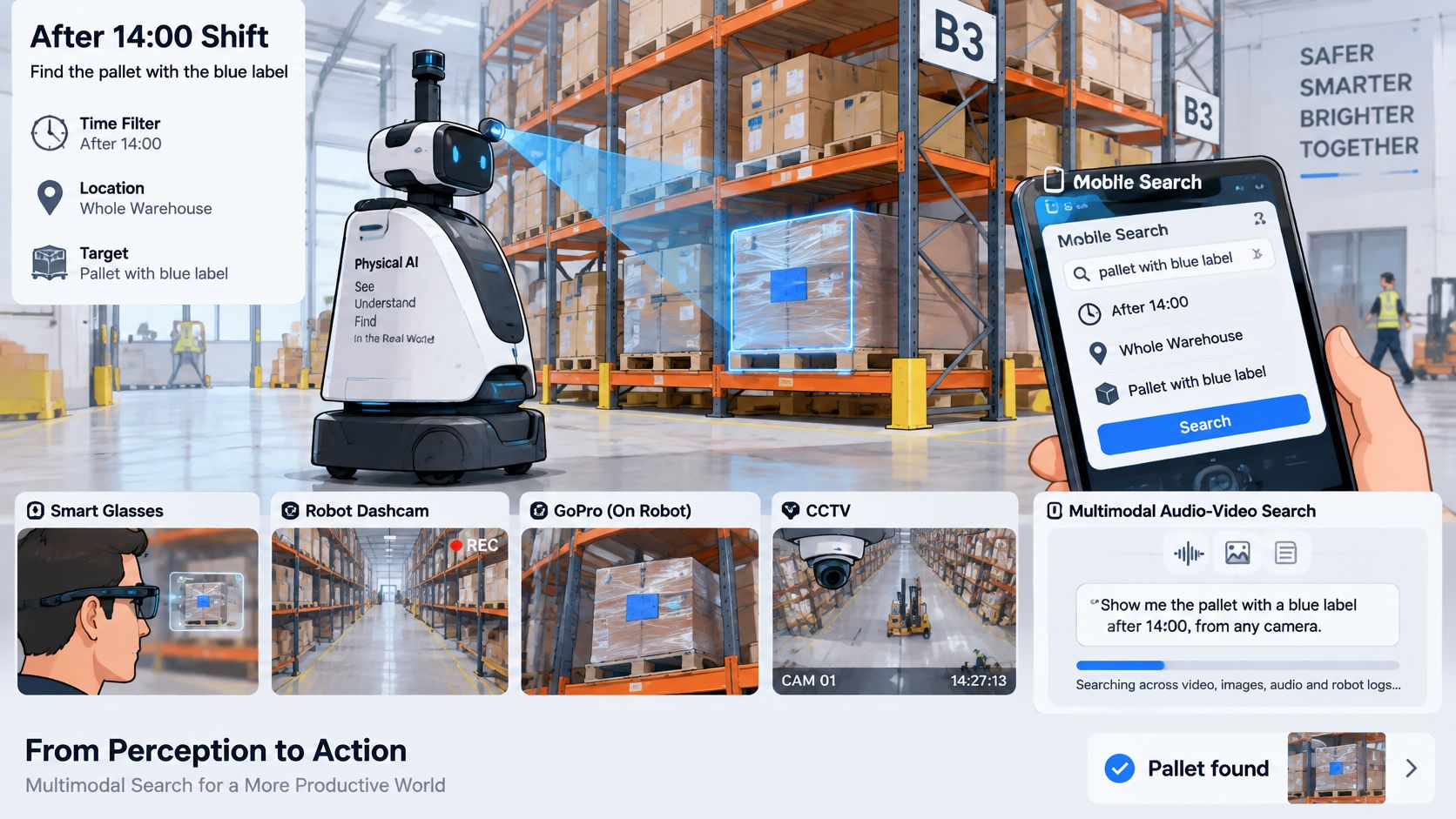
"Where's the pallet with the blue label that arrived after the 14:00 shift?" A warehouse robot answers from its own camera memory, returning the segment where that label passes into view and where the pallet was set down. The operator doesn't replay the shift. They check the returned moment and send the robot, or a person, to that spot. This is the Robotics stack, and its core need is nearby memory with low delay.
Audio asks a different question. "What happened right after the forklift horn?" The robot heard a horn, or a dropped box, and needs the matching frames before anyone decides whether it was a near miss or routine noise. Multimodal Audio search connects the sound to the picture at the same timestamp, so the team reviews one event instead of hunting separately through sound and video recordings.
Dashcam, GoPro, smart glasses, and mobile
"Show me sudden braking near a school zone." A fleet manager gets timestamped segments from long drives instead of full route files. The DashCam stack has to cope with vehicles that connect only at depots or over metered links, so useful segments matter more than uploading everything.
A rider with a GoPro asks something simpler. "Find the jump, and find the crash." The value is skipping a long ride file and landing on the few seconds worth sharing or reviewing. Playback should open at the moment, ready to trim.
Smart glasses turn search into personal recall. A technician asks, "Where did I leave the torque wrench?" The Smart Glasses stack returns the clip showing the wrench set down on a bench. Capture has to be unobtrusive, and retrieval has to be quick enough to help during the job, not after it.
The Mobile stack ties many of these together. Companion apps written natively in Swift for iOS, Kotlin for Android, or once in Flutter for both, need visible upload progress, real cancellation, and playback that doesn't freeze the phone during large uploads or live streams. Users forgive a slow network. They don't forgive an app that stops responding.
| Device stack | Typical workflow | Core need |
|---|---|---|
| Robotics | Find a pallet by its label or a forklift horn from robot memory | Edge memory and low latency |
| Dashcam | Find sudden braking near a school zone | Segments from long drives with intermittent connectivity |
| GoPro | Find the jump or the crash in a ride file | Playback without scrubbing long files |
| Smart glasses | Find where the torque wrench was left | On-device capture and quick clip retrieval |
| Mobile | Companion apps on Android, iOS and Flutter | Upload progress, cancellation and no UI freezes |
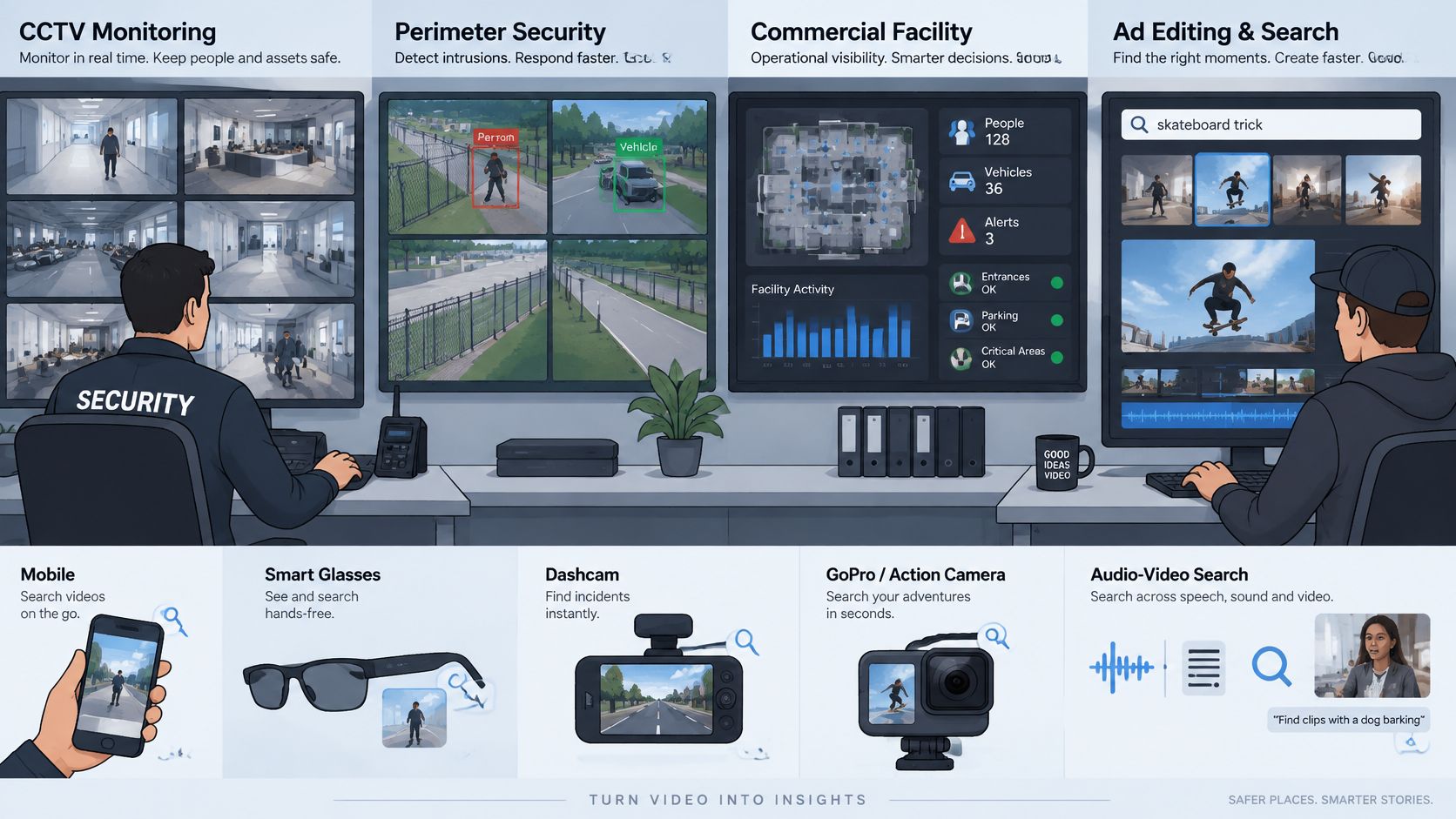
| CCTV | Find a person at a boundary with glass breaking | On-premises control and proof |
Be honest about the limit here. These devices don't share one proven common software stack. Camera placement, microphones, storage, and connectivity differ enough that a query which works on a phone sample can disappoint on glasses or a robot. Test each device with its own real footage, including bad light and background noise, before you commit to a design.
CCTV, Surveillance and Ad Editing in Recent Practice
Surveillance buyers still keep systems close to home. On-premises systems represented 64.35% of AI video-surveillance revenue in 2025, while hardware represented 56.15%, according to Mordor Intelligence's AI in video surveillance market report. Commercial facilities accounted for 43.05% of end-user demand, perimeter security represented 27.95% of applications, and Asia-Pacific held 36.55% of global revenue.
Those splits describe market structure, not the accuracy of any one search product. They still tell integrators something practical. Customers want local control, compatibility with cameras they already own, alerts without delay, and searches that shorten review without exporting every stream to a remote service.
One event, searched once
Say a warehouse operator gets a vague report from the night shift. Someone crossed the yard boundary, and someone else heard glass breaking near a side door. In an older workflow, those become two reviews. One person scans the boundary camera. Another looks for the sound, if audio was kept with the video at all.
A multimodal query treats it as one event. The operator searches for a person crossing the boundary together with glass breaking or an alarm sounding, then checks the returned segment as evidence. CCTV and Video Surveillance work is judged on speed, retention, and proof. The result has to be a clip a supervisor, insurer, or investigator can replay, with the time and camera clear.
That doesn't remove human judgement. It changes where judgement gets spent. Instead of paying people to watch empty yards, you pay them to decide whether a returned moment is a trespasser, a contractor who took a shortcut, or a false alarm worth tuning.
The same move inside an ad library
Advertisement video editing rewards the same moment retrieval, under different pressure. An editor building a cut describes the scene she needs, such as a hand holding the product at a bright window. Search jumps to matching segments across the library, ready to compare and trim, instead of forcing her to watch every clip from a long shoot.
Here a miss costs time and creative choice, not site security. Approval matters more than retention law. Storage can usually sit centrally, and an editor may prefer several near matches over one strict answer, because the second best take sometimes cuts better.
Write the requirement in the user's words before you pick the tool. "Find a person at the fence when glass breaks" and "find the hand held product shot at the window" lead to different storage, latency, and approval choices, even though both are moment searches.
Put side by side, surveillance cares about answering fast, keeping footage under local rules, and proving what happened. Ad editing cares about finding the right take quickly and moving it into a timeline. If you mix those requirements up, you'll buy the wrong thing. A catalog tool dropped into a control room may demand uploads the site can't allow. A locked down surveillance tool handed to editors may make sharing takes painfully slow. Name the job first, then judge the search.
Pick Your First Integration Path
Start narrow. A first integration should prove one real query on one device stack, not attempt every camera and use case at once.
A three step checklist
- Pick the platform you'll ship on. That might be Android in Kotlin, Flutter across Android and iOS, smart glasses, IoT or camera hardware, or robotics edge hardware.
- Confirm where footage lives. Decide what must stay on the device or site, what can move to a nearby hub, and what may be uploaded for shared review.
- Test one real query on your own short clip. Use the words your user would say, then check whether the returned moment is the right one before you scale to an archive or a fleet.
The order matters. Platform choice without a storage answer leads to redesigns when a customer refuses uploads. A storage plan without a real query test leads to confident architecture diagrams and disappointing results on actual footage.
| Target platform | SDK or resource | License or status |
|---|---|---|
| Android (Kotlin) | com.vmodal.vmodal-sdk-android, repo v-modal/vmodal_sdk_android | Apache-2.0 |
| Flutter (Android and iOS) | Flutter SDK wrapper | Cross-platform wrapper for Android and iOS |
| Smart glasses, IoT and cameras | Smart Glasses / IoT / Camera SDK | Released; license to confirm |
| Developer documentation | v-modal.com/developers | Developer hub with setup guidance |
The first run follows a short path. Add the SDK to your app, configure a project with an API key, upload a video, and run the first search. That loop takes minutes, which makes it practical to test before you argue about a full rollout. Our developer hub is at v-modal.com/developers, setup questions go to our developer community on Discord with the team, and you can also review the DevHunt listing for the visual video search SDK while you compare options.
Apply the architecture verdict to your starting point. If answers are needed offline or within seconds, begin with the edge facing SDK for glasses, cameras, or robotics hardware, and keep memory near the source. If you're serving a catalog to viewers or editors, begin with the mobile SDK and a small test library of your own footage. Either way, judge the first build by one plain question. Did it return the moment your user asked for?
Bring one real clip, one real question, and the device you plan to ship, then test whether searchable memory returns the moment in seconds instead of asking your team to scrub for hours. V-Modal AI builds multimodal video and audio search for Physical AI across mobile, smart glasses, cameras, and robotics, with SDKs to help you run that first test quickly. Start exploring the code and examples at V-Modal AI, then pick the platform path that matches your device.