Search in Video: How to Build Searchable Video in Apps
You've got the recording, but not the moment you need. Someone's dragging a playback slider through a long file while the app team debates whether a search box would solve the problem. It might, but only if the result opens the right evidence and the device can keep working after the demo ends.
Search in video is a retrieval, trust, and operations problem. A useful build gives users reviewable moments, makes uncertainty visible, and handles interrupted uploads, offline recording, and deletion without leaving misleading results behind.
Table of Contents
- What Search in Video Returns at Each Stage
- Pipeline stages, outputs and common failure points
- How to Build Searchable Video in Your App
- Build the smallest complete workflow
- Define done before adding scale
- Query Modes for Text, Image, Voice and Sensor Input
- Query modes, example inputs and typical weak points
- Keep the meaning of each input clear
- Reading Results, Timestamps and Confidence
- Give reviewers context without burying the event
- Run a repeatable verification routine
- Running Search on Phones, Glasses and Edge Hardware
- Device classes, main constraints and starting settings
- Define what the device preserves
- Industry Use Cases from Ads to Robotics and CCTV
- Industry use cases, typical queries and success measures
- Match the evidence standard to the job
- Run a Pilot Before You Commit to Search in Video
- Set acceptance rules before running queries
- Prove the integration before approving deployment
What Search in Video Returns at Each Stage
Say a fleet manager needs the eight seconds before a hard brake. Across town, a media editor needs a three-second product shot on a white table. Neither wants a list of vaguely relevant files. They need a usable clip.
The scale makes manual review an expensive default. DataReportal's April 2025 global analysis found that more than 9 in 10 internet users watched online video each week, excluding major subscription services such as Netflix. For developers, that's a reason to treat retrieval as a core workflow, not an optional catalog filter.
A filename can identify a recording. It can't reliably describe everything that happened inside it. Search therefore needs a clear handoff from captured media to a result someone can verify.
Pipeline stages, outputs and common failure points
| Stage | What you do | Output you get | Where it usually fails |
|---|---|---|---|
| Source capture | Choose cameras, microphones, phone or glasses feeds | Continuous video and audio streams | Dropped frames and mismatched device clocks |
| Ingest | Upload or stream media in chunks | Stored media with progress and cancel state | Interrupted uploads on cellular networks |
| Indexing | Index frames, speech and audio events | Searchable multimodal index | Coarse sampling misses brief events |
| Query | Send text, image, voice or sensor context | Ranked candidate moments | Vague wording returns near-duplicate scenes |
| Result handling | Read start and end timestamps for each hit | Clip ranges with confidence | Audio and video timestamps drift apart |
| Verification | Play the expanded clip before acting | Confirmed, rejected or uncertain hit | Fluent summaries hide missed events |
Each output becomes the next stage's input. A polished results screen can't repair footage that never arrived, and a convincing description doesn't establish that the camera clock was correct.
Keep these stages visible in the application's state model. Uploading, processing, searchable, unavailable, and deleted should mean different things to the user. Don't show an empty search result when the actual problem is unfinished processing.
Mark which rows your app owns, which the hardware or cloud service handles, and which require a human check. Assign an owner to each failure state before adding more query features.
How to Build Searchable Video in Your App
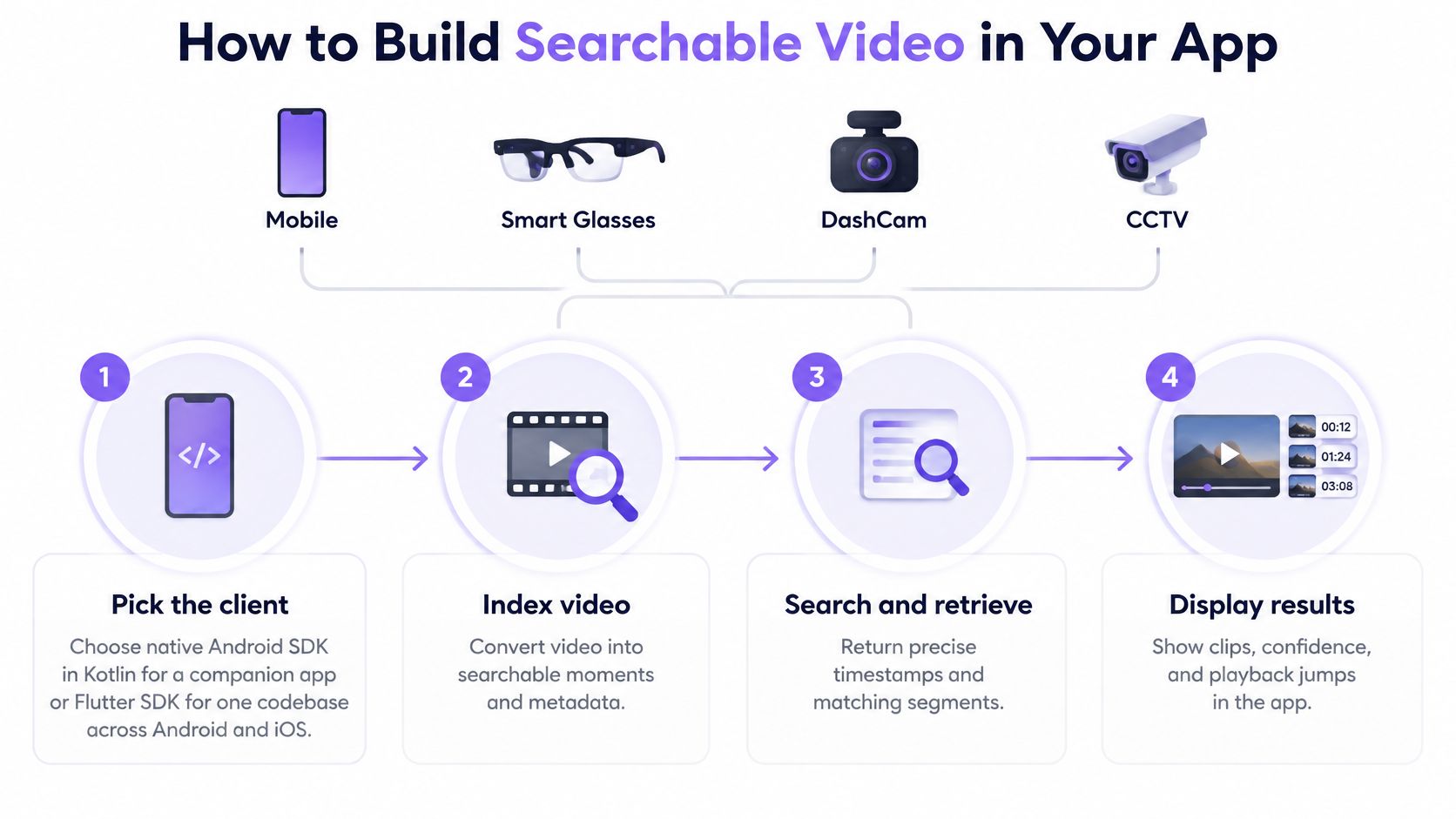
Start with the client, not the search interface. Android lifecycle behavior, Flutter playback integration, and an embedded Linux deployment create different failure modes even when they expose the same search workflow.
The first build should prove a complete path from a known recording to a playable, verified result. Keep the retrieval implementation behind the SDK boundary rather than building a separate search engine.
Build the smallest complete workflow
-
Pick the client that owns the user interaction. Choose the native Android SDK in Kotlin for an Android companion app, Flutter for a shared Android and iOS application, or the edge build for embedded Linux robots and camera hubs. Don't assume a cross-platform interface removes platform-specific work around background execution, permissions, and playback.
-
Read the example before writing integration code. The Android package is
com.vmodal.vmodal-sdk-android, published inv-modal/vmodal_sdk_android; the SDK integration listing is another starting point for evaluation. Check the example's initialization and media lifecycle rather than guessing method names or copying an outdated dependency declaration. -
Create a project and configure credentials deliberately. Load the API key through build configuration or a secure store, never a committed source file. Build configuration keeps secrets out of the repository, but it doesn't make a credential embedded in a distributed application impossible to extract, so review the supported credential controls before release.
-
Choose the input scope. Start with full video, audio-only recordings, still images, or a clearly defined mix, and label each source with its device name and timezone. Assuming every device clock agrees makes later cross-camera review unnecessarily difficult.
-
Make transfer controls real. Use chunked uploads, display progress, and connect cancellation to the underlying upload rather than merely dismissing the screen. Don't send full-resolution footage over cellular by default; let users understand the transfer cost and choose an appropriate connection.
-
Search for a known event. For example, use a clip of about ten minutes containing an unmistakable object or spoken instruction, then log the returned start and end times. Begin with a concrete text query so you can separate integration failures from ambiguous search wording.
-
Open the returned range in the player. Add a little surrounding playback context and confirm that the event is visible or audible. A result card that renders correctly isn't proof that seeking, authorization, and media access work together.
Define done before adding scale
A working first build survives leaving and reopening the app, reports a failed upload clearly, and opens a result without requiring the user to hunt through the original recording. Test with the same media file throughout this stage so changes remain explainable.
Build gate: Don't add live streams until a recorded-file workflow can upload, cancel, search, and play back reliably.
Keep a small integration log with the source identifier, transfer outcome, processing state, query, returned range, and playback outcome. That's enough to identify which boundary broke without exposing the search implementation or collecting unnecessary media in application logs.
Query Modes for Text, Image, Voice and Sensor Input
Offer the input the user already has. A technician holding a photo shouldn't have to describe the object from scratch, and an operator investigating an alarm shouldn't have to guess which recording contains it.
The platform supports text-to-video, image-to-video, voice-to-audio, and environmental-state-to-video intents. Combined inputs are useful refinements, but they shouldn't make the simplest search harder to submit.
Query modes, example inputs and typical weak points
| Query mode | Example input | Best use | Typical weak point |
|---|---|---|---|
| Text-to-video | Product close-up on white background | Ad editors finding B-roll in a catalog | Vague adjectives return similar scenes |
| Image-to-video | Photo of a missing torque wrench | Finding where a known object appeared | Low light and different angles lower matches |
| Voice-to-audio | Spoken phrase stop the conveyor | Robotics operators and dashcam review | Background noise and strong accents |
| Environmental-state-to-video | Temperature alarm or door-open event | Physical AI and inspection logs | Needs a synced sensor timestamp |
| Combined text and image | Reference photo plus same person near exit | Narrowing broad results | Conflicting cues split the results |
Text works best when users name observable details: an object, action, setting, or spoken phrase. Terms such as nice and modern leave too much room for interpretation. Provide editable example prompts rather than rewriting a user's intent.
Image queries carry appearance information, but a reference photo isn't a guarantee of recognition. Darkness, glare, occlusion, and a different viewing angle can weaken a match. Let users crop the reference to the relevant object and switch to a description when the image is unhelpful.
Keep the meaning of each input clear
Voice input isn't always an audio-evidence query. A person dictating a description of a red toolbox has a different intent from someone searching for a previously spoken instruction. Label those actions clearly, and let users inspect any recognized wording before submission.
Environmental-state queries need a trustworthy relationship between the sensor event and the recording. A temperature alarm paired with a door-open event is useful context only when the application can place both on the video timeline.
Combined text and image can narrow a broad result set, but conflicting cues need an explicit response. Don't pretend that an image of one object and text describing another express a coherent request.
For every hit, show the supporting cue: the visible object, matched speech, acoustic event, or associated sensor record. Explain the match without turning that explanation into a claim of certainty.
Reading Results, Timestamps and Confidence
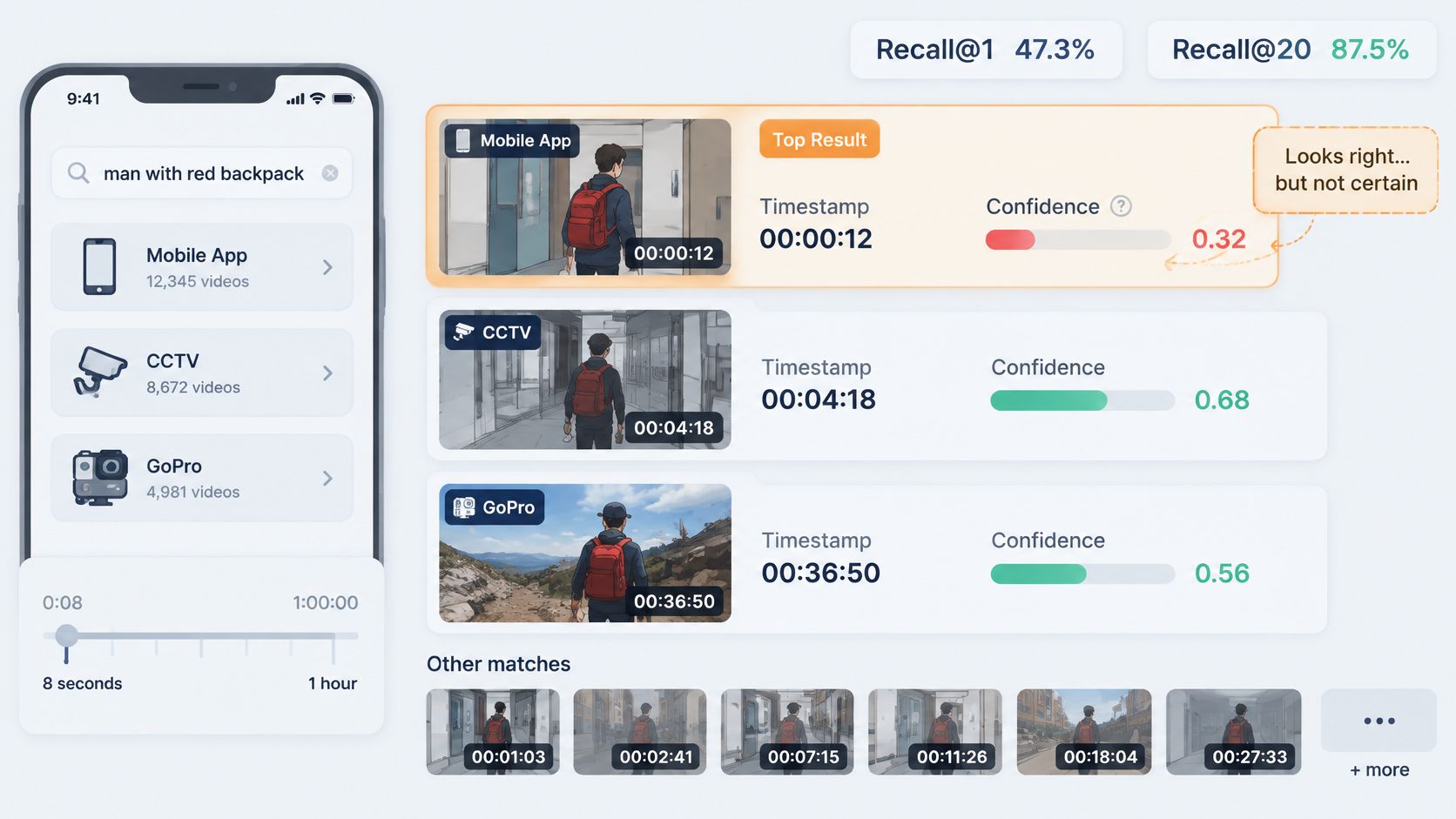
Returning only the highest-ranked result is a fragile product decision. In a long-video retrieval benchmark covering videos from 8 seconds to 1 hour, the strongest tested model achieved 47.3% Recall@1 and 87.5% Recall@20, while another reached 40.3% and 81.9%, respectively.
Those results aren't a forecast for your application. They demonstrate why a ranked evidence set can be more useful than a single confident-looking answer: relevant evidence may exist below the first result.
Give reviewers context without burying the event
I would start with five to ten ranked hits as a pilot interface setting, not an accuracy promise. Make each hit open an expanded playback window rather than a frozen frame stripped of context.
For a hypothetical short event, try five seconds before and ten seconds after the match, then adjust based on reviewer feedback. A shift-length incident needs a different review window from a dropped tool. Merge overlapping playback windows so reviewers don't watch the same event repeatedly.
Show absolute timestamps, timezone, and camera or device name as the primary evidence reference. Keep the file-relative offset available for seeking and diagnostics, but don't force reviewers to calculate when an event happened.
Preserve aligned audio during playback. A visible reaction may make sense only after the reviewer hears the instruction, alarm, or impact immediately around it.
Run a repeatable verification routine
- Play the expanded window: Inspect the frames and listen to the available audio before accepting the match.
- Classify the result: Mark it correct, near miss, false positive, or uncertain.
- Record the reason: Note wrong object, wrong time, missing context, inaudible speech, or another concrete failure.
- Keep the review outcome: Associate the decision with the query and source so the pilot team can compare failures consistently.
A confidence score needs careful labeling. Unless it has been calibrated for your deployment, don't display it as the probability that an event happened. A ranking score can help order review without establishing factual certainty.
Long windows can hide brief evidence, duplicates consume reviewer attention, and top-result-only evaluation ignores useful lower-ranked matches. Check each separately.
A summary can sound right while the linked clip shows the wrong event. Require frame-level review before a safety, legal, or operational decision.
Running Search on Phones, Glasses and Edge Hardware
A cloud demo rarely answers what happens when the device loses connectivity, fills its storage, or gets too hot to continue background work. Those aren't unusual exceptions for mobile and edge products. They're operating conditions.
The World Economic Forum's report on Physical AI in industrial operations describes the importance of deploying physical intelligence under constrained compute, power, memory, and connectivity. Treat local versus cloud processing as a deployment decision, not a slogan: local work consumes device resources, while remote work requires transfer and service availability.
Device classes, main constraints and starting settings
| Device class | Main constraint | Setting to start with | Watch for |
|---|---|---|---|
| Android companion app | Battery, thermal throttling, cellular upload | Index on Wi-Fi while charging, cap preview resolution | Background kills during long uploads |
| Smart glasses | Heat close to skin, small storage | Index short rolling windows, keep the audio path light | Overheating after long sessions |
| DashCam | Storage loop, intermittent cellular | Keep a rolling buffer, upload only flagged segments | Missing evidence when storage fills |
| GoPro or action camera | Battery, SD card speed, very long files | Index after recording ends | Slow scrubbing through long clips |
| CCTV or NVR server | Many streams, retention rules | Recent footage in detail, older footage as summaries | Clock drift across cameras |
| Edge hub or robot | Power budget, offline operation | Local index with scheduled sync | Model updates that invalidate old indexes |
Use these as starting policies, then measure on the actual hardware. An Android emulator won't tell you how a phone behaves while recording, charging, and transferring media in a warm vehicle.
For smart glasses, keep capture usable before adding continuous processing. Heat near the skin is a product constraint, not merely a slower benchmark. For GoPro footage, post-recording processing avoids competing with capture for battery and storage access.
Define what the device preserves
A rolling buffer must distinguish disposable footage from protected evidence. If a DashCam flags an event, make the protection state visible and test whether storage cleanup respects it.
For CCTV, recent detail and older summaries can reduce the review burden, but a summary isn't retained evidence. If the original footage expires, the interface must stop implying that the user can verify its contents.
On robots and edge hubs, schedule synchronization around operational needs. During a model update, preserve a rollback path and decide whether previously searchable history remains available while rebuilding. Don't present partial coverage as a complete search.
Before launch, answer these questions explicitly:
- Offline duration: What remains searchable after prolonged disconnection, and how does the interface show incomplete coverage?
- Full storage: Which content is removed first, and which protected recordings must survive?
- Transfer recovery: Can interrupted work resume without duplicate sources or misleading completion states?
- Model changes: Who approves the update, tests historical queries, and owns rollback?
- Deletion scope: Does removal cover originals, previews, searchable derivatives, and synchronized copies?
- Resource limits: What pauses first when battery, temperature, or available storage crosses your operating limits?
Decide these policies before weeks of recordings accumulate. Recovery is much harder when nobody can explain which copy is authoritative.
Industry Use Cases from Ads to Robotics and CCTV
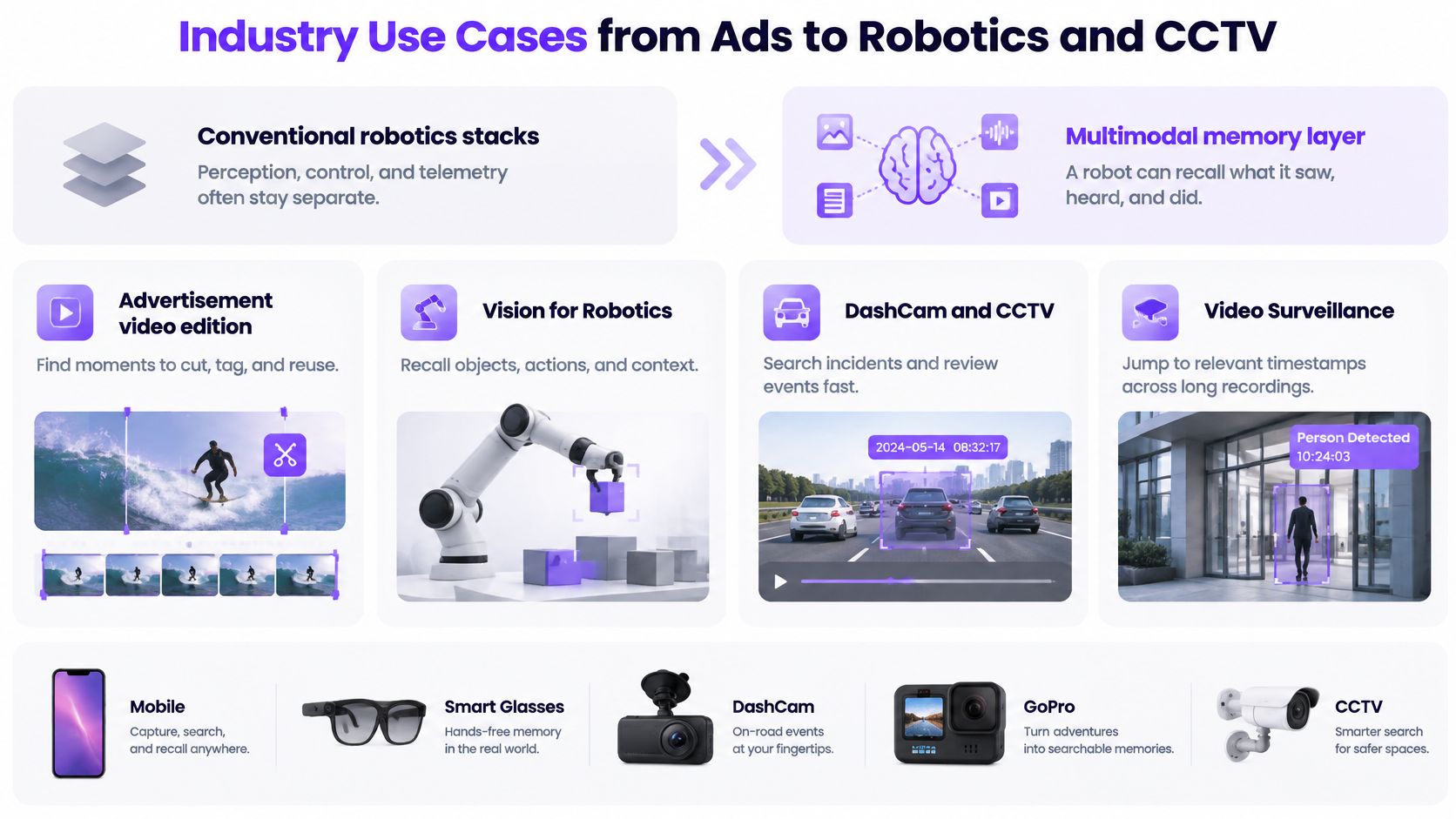
Conventional robotics stacks often keep perception, control, and telemetry in separate components. A Physical AI memory layer connects historical camera observations, spoken commands, machine sounds, and operational context so an operator can investigate what preceded an action.
That differs from media content search. An editor wants a reusable shot; a robot operator wants evidence about a physical sequence. Both benefit from multimodal video and multimodal audio, but they shouldn't share the same acceptance criteria.
Industry use cases, typical queries and success measures
| Use case | Typical query | Signals combined | Success measure |
|---|---|---|---|
| Advertisement video edition | Product close-up on white background | Frames, speech, music cues | Time from brief to usable clip |
| Vision for robotics | Pallet blocking aisle 3 | Camera plus robot telemetry | Correct moment in top five hits |
| Audio for robotics | Metallic impact near conveyor | Microphone plus motor state | Time from alarm to reviewable clip |
| DashCam | Hard braking at an intersection with horn | Front and cabin camera, GPS, audio | Evidence clip with original timestamps |
| CCTV and video surveillance | Person near loading door after 22:00 | Multiple fixed cameras, glass-break sound where lawful | Reviewer hours per incident |
| Smart glasses and GoPro | Where did I leave the torque wrench | Camera and microphone | Correct hit within the last session |
These are example queries and proposed pilot measures, not promised performance levels. Choose the measure that reflects the user's completed task rather than counting search requests.
Match the evidence standard to the job
For advertisement video edition, an editor might search a product catalog for clean B-roll, then reject otherwise relevant shots because packaging is outdated or the framing won't fit the placement. Search can reduce discovery work, but it doesn't establish usage rights or editorial suitability.
Vision for Robotics needs context around occlusion and movement. A pallet visible beside an aisle isn't necessarily blocking it, and a robot's later position doesn't prove where the obstruction began. Pair the camera view with the relevant operational record.
Audio for Robotics can surface an impact that the camera missed. However, a metallic sound alone doesn't identify a failed component. Review motor state and surrounding activity before escalating to maintenance.
DashCam systems illustrate the shift from passive recording toward operational support. A Dataintelo 2025 fleet-dashcam market estimate attributed 58.0% of market value to edge AI dashcams and 64.0% of spending to software and subscription services. For a fleet pilot, test the complete hard-braking-and-horn scenario, including poor weather, night imagery, and restricted access to cabin footage.
CCTV and video surveillance introduce multi-camera ambiguity. Similar clothing, blind spots, and unsynchronized recordings can produce plausible but incorrect sequences. Privacy and retention rules must also govern who can search and export clips.
Smart glasses and GoPro searches are narrower but still uncertain. Finding the last recorded appearance of a wrench doesn't prove it's still there. Phrase the answer as a recorded observation, not a statement about its current location.
Run a Pilot Before You Commit to Search in Video
Better retrieval can increase risk if users overtrust a fluent explanation. Research on physical-AI timing and safety guarantees identifies a gap between current edge perception and dependable real-world sense-think-act requirements. Your pilot should test reviewer behavior as well as search quality.
Choose a bounded task, such as locating a blocked warehouse aisle. Name the reviewer, agree on a review deadline, and define where disputed clips go. An uncertain result should trigger escalation, not an automatic operational conclusion.
Set acceptance rules before running queries
As a practical pilot design, gather 30 to 50 real queries with human-marked reference moments. Set a proposed acceptance rule that the correct moment appears in the top five and a reviewer confirms it within an agreed time; these are test settings, not benchmark claims.
Include absent events and ambiguous requests, not just easy positive examples. A useful system must let reviewers conclude that the available recording doesn't establish an answer.
- Offline test: Disable the network for an hour during recording, then inspect capture continuity, local availability, and recovery.
- Deletion test: Remove a source and confirm it disappears from search and cannot be reopened through an old result.
- Review test: Track confirmed matches, misses, false positives, uncertainty, and time to a defensible decision.
Prove the integration before approving deployment
Check the SDK repositories and examples under the v-modal GitHub organization before starting. Add the SDK, configure the project API key securely, upload a test video in chunks, and search for a known moment.
Our mobile media features include signed streaming URLs, chunked multipart uploads, progress reporting, and real upload cancellation. The initial add-configure-upload-search path is designed to take minutes, but that first result isn't deployment acceptance.
Make the decision explicit. Go when the agreed retrieval, review, offline, and deletion checks pass; extend when failures are understood and bounded; stop when reviewers repeatedly encounter false positives they can't verify quickly.
V-Modal AI offers a Visual Memory Layer for Physical AI with multimodal video and audio search for mobile, edge hardware, and connected cameras. Visit V-Modal AI to inspect the SDKs and examples, then build a pilot around one recording, one known event, and a clear human verification rule.