Can AI Analyze Video? What It Detects and Where It Fails
A dashcam clip may contain the moment a car changes lanes, while a CCTV recording may hold one brief visual clue among hours of footage. AI can return labeled objects, actions, speech and timed events, but the result depends on the footage and the task. Face-identification performance, for example, varies with video quality and how a system handles the scene, so test it on the footage you intend to use.
The useful question is what the system can return, how precisely it can locate a moment, and what you should verify before acting. A label identifies something; a timestamp helps you find when it happened. Those answers can be useful in different ways, even when they come from the same recording.
Table of Contents
- What AI Can Pull Out of a Video
- Detection isn't interpretation
- Choose the output before the tool
- Why Timed Events Matter More Than Labels
- Boundaries are part of correctness
- Test a moment you already know
- Why Video Is Harder Than a Single Photo
- Check the capture conditions first
- Separate misses from false alarms
- Audio and Video Together in Robots, Dashcams and CCTV
- The reviewer's task changes the standard
- Adoption doesn't establish retrieval accuracy
- Choosing Edge, Phone or Cloud for Video Analysis
- Use a hybrid decision rule
- Mobile and Device Stacks for Video Search
- Match the stack to the recording pattern
- Measure the whole application
- Privacy Limits to Check Before You Deploy
- Protect against inference, not just identification
- Apply a purpose-limited checklist
- Run Your First Video Search in Minutes
- Make the pilot decision explicit
What AI Can Pull Out of a Video
Video AI returns different kinds of answers. Finding a forklift, recognizing unsafe driving and transcribing a conversation are separate tasks, even when an application presents them in the same search box.
Think of analysis as a chain: detect something, interpret it, locate it in time and present a result someone can check. Success at one link doesn't guarantee success at the next. A system might correctly detect a person beside a fence while incorrectly describing that person as climbing it.
AI video analysis capabilities at a glance
| Capability | What it returns | Example query | Reliability note |
|---|---|---|---|
| Object detection | Labeled boxes on specific frames | Show every frame with a forklift | Strong for clear, well-lit objects; small or distant ones are missed |
| Action recognition | Action label for a clip segment | Find a person climbing a fence | Confused by visually similar actions |
| Speech and audio transcription | Timestamped text | When does the speaker mention pricing? | Accuracy drops with noise, overlap and accents |
| Scene classification | Scene label for segments | Find all parking-lot scenes in a dashcam day | Works best with distinct environments |
| Temporal event localization | Start and end times for an event | Find the two seconds a person enters the loading dock | Sparse frame sampling can miss short events |
| Audio-visual event matching | Matched sound and visual moments | Find a horn that follows a visible cut-in | Requires synchronized audio and video timestamps |
Detection isn't interpretation
A labeled box says that a model found an object in an image region. It doesn't establish who owns it, why it's there or whether someone used it correctly. Similarly, a transcript provides words, not proof that the speaker's statement is true.
This distinction has a long history. In NIST's Face Recognition Vendor Test 2002, the leading three systems experienced an average performance decline of about 3 percentage points when video imagery replaced still photographs under controlled indoor lighting. Detecting faces across footage could assist the pipeline without making the actual identity match more reliable.
Choose the output before the tool
General multimodal assistants suit exploratory questions about uploaded clips. Enterprise video agents connect observations to operational workflows, such as inspection review or incident routing. Dedicated search layers for Physical AI serve a different purpose: helping applications retrieve relevant moments from camera, phone and robot history.
For a mobile product team, a useful result might be a product scene that opens directly in the player. For a security operator, it might be an entrance event with surrounding footage. For a robot developer, it could be a past interaction associated with a spoken instruction.
The important shift is from asking for a description of the whole file to asking for labeled moments you can inspect.
Why Timed Events Matter More Than Labels
A clip-level label tells you which book is on the library shelf. A timestamp tells you which page to open. Both help with navigation, but only one gets you close to the passage you need.
Temporal event localization returns the beginning and end of an event matching a description. Say an operator has a thirty-minute CCTV recording and needs the two-second moment when someone enters a restricted loading dock. These are hypothetical test conditions, but they expose a practical difference: returning the entire recording labeled “person” doesn't solve the operator's problem.
Boundaries are part of correctness
Opening and closing a door can look similar in an isolated frame. Entering before an alarm is different from entering after it. An event's duration also matters: briefly touching a control isn't equivalent to holding it down.
The TimeLoc paper reports improvements over prior best systems of 1.3 and 1.9 percentage points in mean average precision on THUMOS14 and EPIC-Kitchens-100, respectively. Those are benchmark improvements, not promises about accuracy on your warehouse footage.
A result can identify the right activity but still start too late or end too early. That matters when the missing context changes the interpretation, such as whether a person placed an object down or picked it up.
Sparse keyframes create another failure point. A brief action can happen between the frames a tool examines, just as a security guard taking occasional snapshots could miss a quick handoff.
Practical check: Ask for an event's start time, end time and available confidence information, then play the surrounding footage rather than accepting the thumbnail.
Test a moment you already know
Use a recording you've manually reviewed. Search for a brief event, a similar-looking non-event and a sequence whose order matters. Check whether the tool separates them.
If the application only returns broad clip labels, treat them as navigation aids, not event-level evidence. A confidence score can help prioritize review, but it's not a substitute for checking the actual segment.
Why Video Is Harder Than a Single Photo
A clear photograph isn't equivalent to a video frame. A photographer can wait for a face to turn toward the lens; a ceiling camera records whatever happens under the lighting available.
In its 2017 Face in Video Evaluation, NIST tested 36 prototype algorithms from 16 commercial suppliers on 109 hours of video, reporting identification rates among stronger algorithms ranging from approximately 60% to above 99%, depending on video quality and scene handling. This was a face-identification evaluation, not a universal accuracy measurement for every kind of video analysis.
Check the capture conditions first
Before changing software, inspect what the camera recorded. Enlarging a distant subject on your screen doesn't recover missing detail. A more confident answer from a model won't restore a face hidden by an unfavorable angle.
Conditions that degrade video analysis and what to do
| Condition | Why it hurts results | What to do |
|---|---|---|
| Small or distant subjects | Few pixels to match or classify | Use a closer camera angle or a higher-resolution stream |
| Uneven or low light | Colors and edges become unreliable | Add lighting or test night footage separately |
| Compression and motion blur | Detail is lost between frames | Raise the bitrate or frame rate for fast motion, and check exposure |
| Subject not facing the camera | Face and pose cues disappear | Add a second angle or rely on action and object cues |
| Long recordings with few relevant seconds | Keyframes skip brief events | Use event-aware sampling and check returned timestamps |
| Noisy or overlapping audio | Speech and sound cues blur | Place the microphone close to the source and test with real noise |
Low-resolution phone exports and action-camera footage deserve particular attention. A clip that looks acceptable during ordinary playback may lack the detail needed to distinguish similar objects.
Higher frame rates also aren't a cure for every motion problem. If exposure remains too long, individual frames can still be blurred. Check the captured frames rather than assuming a recording setting solved the issue.
Separate misses from false alarms
Practitioners face different costs when software misses an event and when it flags something harmless. A media editor can discard an irrelevant highlight candidate. A surveillance operator repeatedly interrupted by false alarms may stop trusting the system.
Use confidence thresholds to control review workload, but examine what disappears when you raise them. Include hard negatives, such as an employee walking past a restricted door without entering.
A vendor demonstration shows what worked in the demonstration. Your acceptance test must show what works with your camera placement, lighting and recording settings.
Keep difficult footage in the test set. Removing darkness, crowds and awkward camera angles produces a cleaner demonstration, not a more dependable deployment.
Audio and Video Together in Robots, Dashcams and CCTV
A robot may see a tool in its gripper while a microphone captures an unusual motor sound. Neither observation alone tells the operator everything they need. Multimodal Video and Multimodal Audio become useful when the application can connect observations from the same event.
Capgemini's Physical AI report describes multimodal foundation models combining audio and tactile inputs with images, text and video. That supports the technology direction, but it doesn't establish a universal accuracy threshold for robotics or surveillance.
Audio and visual cues by setting
| Setting | Visual cue | Audio cue | What the search returns |
|---|---|---|---|
| Warehouse or factory robot | Tool visible in the gripper | Unusual motor sound | Timed clip where both occur |
| Dashcam | Vehicle cutting in | Horn | Seconds of footage before the horn |
| CCTV and video surveillance | Person entering a restricted door | Glass break or alarm | Timed segment for operator review |
| Smart glasses | Object in the wearer's view | Spoken request | Moment the request was made |
| GoPro and action cameras | Rider or skier mid-jump | Crowd cheering or wind noise | Highlight candidates to trim |
| Advertisement video edition | Product on screen with a person speaking | Voiceover line | All clips for one ad variant |
The reviewer's task changes the standard
Vision for Robotics can locate a visible interaction; Audio for Robotics can help locate a relevant machine sound or instruction. The robot developer still needs to distinguish an association from a cause. A sound occurring while a tool is visible doesn't prove that tool produced it.
For dashcams and video surveillance, preserve lead-in context. A horn can follow an unrelated event, and an alarm may originate outside the camera's view. For GoPro footage, wind noise may produce a candidate worth reviewing without being a reliable highlight signal.
In advertisement video edition, the editor's task is different: find usable product-and-voiceover combinations, then check branding, rights and continuity. Search produces a shortlist, not a finished campaign.
Adoption doesn't establish retrieval accuracy
Wistia's 2025 report found that 41% of surveyed businesses used AI for video creation, more than double the 2024 level, according to CMS Critic's account. Adwave's summary of Wyzowl's 2026 survey reports that 63% of video marketers had used AI tools to create or edit marketing videos.
For surveillance, a Genetec survey cited by Dataintelo found that 37% of surveyed video-management-system end users planned AI-powered features in 2025, up from 10% in 2024. Mordor Intelligence attributes 42.34% of 2025 global AI video-analytics revenue to video-content analytics, including object detection, motion analysis and scene analysis.
These figures describe adoption, intent and revenue, not search quality. Across settings, the useful deliverable remains a timed segment or shortlist for review, with camera, microphone and robot-log timestamps aligned.
Choosing Edge, Phone or Cloud for Video Analysis
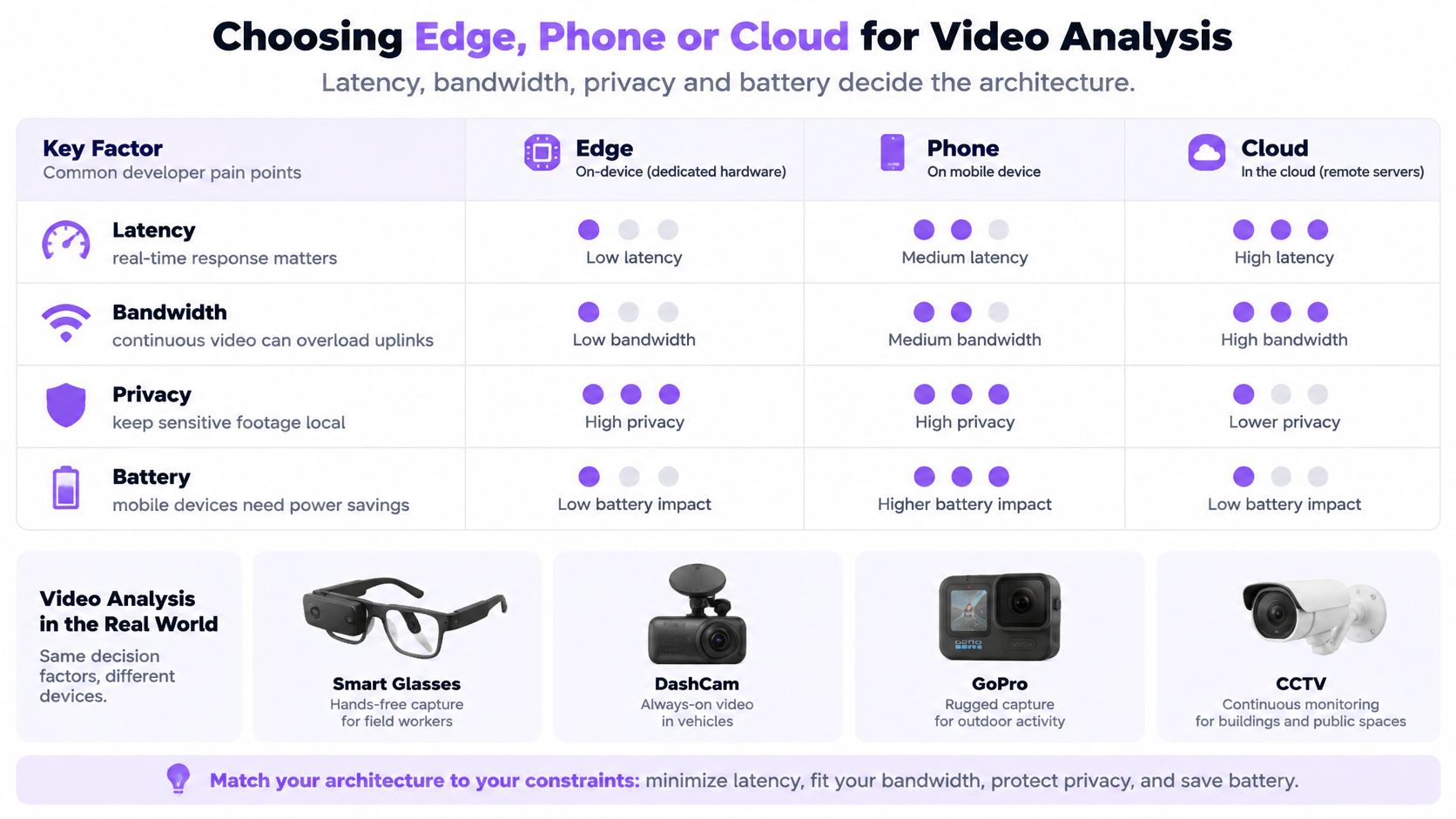
A camera sees an event, but the analysis may happen on the camera, a nearby phone or a remote server. Each choice shifts the balance among response time, bandwidth, privacy and battery use. Published measurements offer examples, though they compare different systems rather than a single controlled test.
Reported latency and bandwidth by architecture
| Setup | Reported latency | Bandwidth effect | Context |
|---|---|---|---|
| Cloud-dependent architecture | About 730 ms | Comparison baseline | Privacy-preserving system tests |
| Cloud path under data-rate limits | About 900 ms | Constrained data rate | Same tests with added constraints |
| Privacy-preserving edge system | About 180 ms | 85% lower | 91.7% detection accuracy in tested threat scenarios |
| Multi-UAV edge testbed (ViEdge) | 302 ms average end-to-end |
A 2025 edge-system paper reports about 180 ms average detection latency for its edge system, compared with 730 ms for its cloud-dependent architecture and 900 ms when data rates were constrained. The paper also reports 85% lower bandwidth use and 91.7% detection accuracy in the tested threat scenarios. Separately, the ViEdge multi-UAV testbed reports 302 ms average end-to-end latency.
Use a hybrid decision rule
Run time-critical detection near the device. Send uncertain cases for further analysis only when connectivity and permission allow. Use cloud infrastructure for heavier archive analysis when the task and network can support it.
A phone can process video from smart glasses or a camera, but sustained analysis competes with other app tasks. Check where the design may fail:
- Connectivity: Uploads can stall or fail as coverage changes.
- Cost and capacity: Metered networks and constrained uplinks make continuous video expensive to transfer.
- Heat and memory: Sustained capture and analysis can affect device behavior.
- Model compression: Quantization can reduce memory requirements while lowering accuracy.
Treat the infographic's rankings as architecture shorthand, not measured guarantees. Cloud processing still uses a mobile device's transmission power, and local processing alone does not make an entire application private.
Test daylight, darkness, occlusion and motion blur separately. Choose the arrangement that meets the task's timing and review needs on the hardware you will deploy.
Mobile and Device Stacks for Video Search
Android developers commonly use Kotlin for camera capture, application state and background-work coordination. Start with the camera lifecycle: recording, app suspension and interrupted transfers should behave predictably before you add analysis.
iOS developers use Swift with Apple's camera frameworks, such as AVFoundation, for capture and playback. Confirm which processing tasks can continue when the app leaves the foreground. Flutter can share interface and application logic, but camera permissions, background execution and device integrations still need platform-specific testing.
Match the stack to the recording pattern
| Device stack | Practical design priority | First field test |
|---|---|---|
| Smart glasses | Short event clips and selective transfer | Capture while the companion phone disconnects |
| DashCam | Local recording with usable timestamps | Retrieve an event across a recording-file boundary |
| GoPro and action cameras | Balance resolution, bitrate and fast motion | Inspect moving subjects in exported footage |
| CCTV recorder or NVR | Choose recorder-side or local edge processing | Retrieve footage while the uplink is unavailable |
For Android SDK evaluation, use the visual video search SDK listing as a discovery entry point, then verify installation and platform requirements in the current repository. Don't assume a shared API means identical background behavior on Android and iOS.
Measure the whole application
Record time to first usable result, battery or heat impact, and upload size on a mobile network. Measure from the user's action, not just from the moment server processing begins.
For CCTV, include recorder access and playback startup. For smart glasses, include the companion connection. For action cameras, include file transfer and export behavior. These are often the delays a user notices, even when model inference itself feels fast.
Privacy Limits to Check Before You Deploy
More frames don't automatically mean safer or more accurate analysis. A tool can infer sensitive information from ordinary surroundings even when nobody asks it to identify a face.
A 2025 benchmark of 508 everyday personal videos found that vision-language models inferred multiple private attributes with performance exceeding human evaluators, and that frame-sampling strategies could outperform full-video analysis for some attributes. The dataset came from Chinese users and excluded audio, so its findings don't establish equivalent risks across cultures, languages, accents or combined audio-video inputs.
Protect against inference, not just identification
A room's contents, visible documents, routines and interactions can reveal information beyond the event someone intended to record. Blurring faces doesn't remove every contextual clue.
Continuous ambient capture makes this especially important for smart glasses, CCTV and robotics. People in view may not be the device owner, the application user or someone who expects their surroundings to become searchable.
Deployment boundary: Permission to record an event isn't automatically permission to infer everything visible within it.
A warehouse application designed to find misplaced tools shouldn't become an unrestricted way to investigate workers' personal characteristics. Define the allowed purpose in terms an operator can understand and administrators can enforce.
Apply a purpose-limited checklist
- Collect necessary signals: Capture and make searchable only what the stated task requires.
- Separate events from sensitive inferences: Finding a door opening shouldn't expose unrelated personal conclusions.
- Set retention and deletion controls: Include recordings, generated results and accessible copies in deletion testing.
- Keep raw footage local where practical: Limit transfers rather than assuming every query requires a cloud upload.
- Record query permissions: Specify who can search which sources and review access logs.
- Test combined inputs: Review what becomes inferable when sound, video and device context are available together.
Test privacy with the same care as retrieval quality. Ask whether a user can issue an out-of-purpose query, whether deleted footage remains accessible through prior results and whether a shared device exposes another person's history.
A useful system should answer the permitted question without expanding what people can discover.
Run Your First Video Search in Minutes
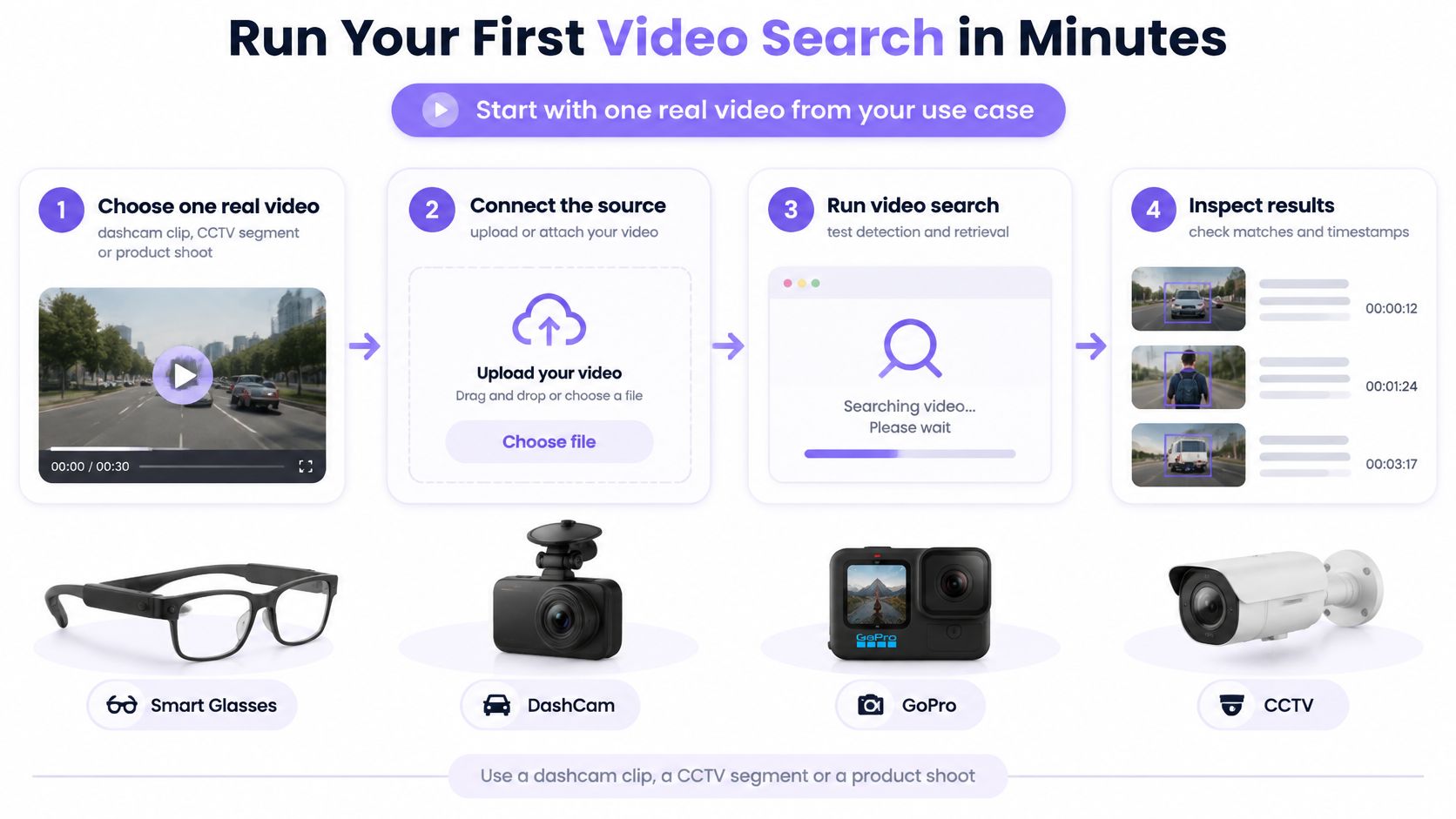
A first prototype should test the complete path from a real recording to a verifiable result. Getting a search response is only part of the job; you also need to know whether the application handles interruptions and opens the right moment.
Use this flow to keep the experiment focused.
-
Choose one real video. Use a dashcam clip, CCTV segment or product shoot you're authorized to process. Manually note a target event and a similar-looking moment that shouldn't match, so you can distinguish retrieval from a plausible answer.
-
Add the SDK for your stack. Our Android package,
com.vmodal.vmodal-sdk-android, is published inv-modal/vmodal_sdk_android; Flutter and the released Smart Glasses / IoT / Camera SDK provide other integration paths. Check the current repository instructions before configuring dependencies. -
Configure a project with an API key. Request keys through the contact page on v-modal.com. Our starting workflow is to add an SDK, configure the project, upload a video and search the first moment, which can take minutes; that isn't a guarantee for production integration.
-
Upload and test interruption behavior. Watch progress reporting, then deliberately cancel a test upload. Confirm that cancellation stops the operation and leaves the interface in a state the user can understand.
-
Search and inspect playback. Submit a text query or input image for the target moment. Compare the returned timestamp with your manual note, and inspect the preceding and following footage.
Make the pilot decision explicit
Record whether the first result is correct, how long the complete request takes and how much data crosses the mobile network. Keep failed queries alongside successful ones.
Move to a limited pilot only when timestamps match your footage on most test queries and the remaining errors are acceptable for the task. If matches drift, clarify the query or improve the camera angle, then rerun the same test set before expanding access.
V-Modal AI offers a Visual Memory Layer for Physical AI with multimodal video and audio search, helping applications retrieve relevant moments from device history. Visit V-Modal AI to explore the SDK repositories and start with a real recording whose results you can verify.